ProductsExpense ManagementSpend Policy Enforcement

Expense Policy Enforcement Software That Stops Out-of-Policy Spend Before Submission

Centime Spend is expense policy enforcement software that checks each expense against your policy before it is submitted, so out-of-policy spend is caught up front instead of after the fact.

View AI-friendly version
    Book a Demo
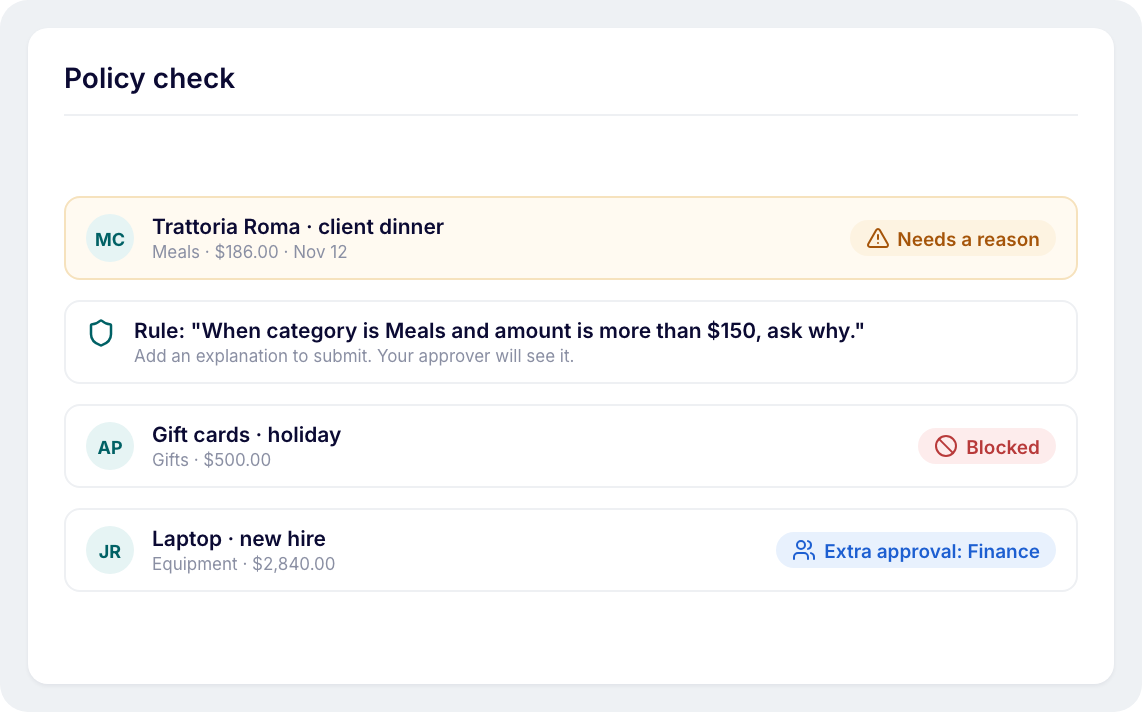
    Policy rules at work, an expense blocked with the reason, in Centime Spend
    Centime Spend is expense policy enforcement software that checks each expense against your policy before it is submitted, so out-of-policy spend is caught up front instead of after the fact. You write the rules as plain sentences, and each expense is blocked, flagged, or sent for extra approval the moment it breaks one. On cards a bank runs through its API, Centime Spend can also stop a disallowed purchase before it happens.

    For finance, that turns policy from a document people ignore into controls that run on their own. The expenses that reach an approver already meet the rules, and the ones that do not are explained or stopped. It is part of Centime Spend expense management, alongside receipt capture, coding, and approvals.
    Why It Matters

    What expense policy enforcement software does, and the after-the-fact problem

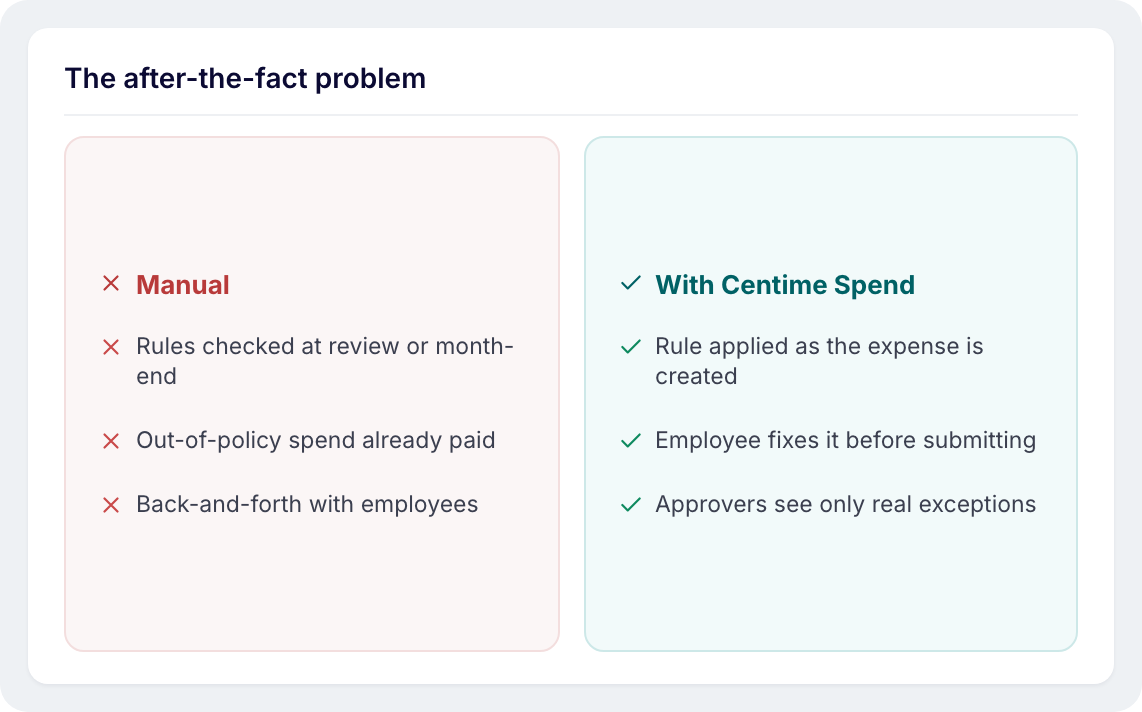
    Expense policy enforcement software applies a business's spend rules to each expense automatically, so the policy is checked by the system rather than remembered by people. Instead of finding out an expense broke a rule at review or at month-end, the rule is applied as the expense is created.

    The after-the-fact problem is familiar: employees keep submitting out-of-policy expenses, and finance only catches them later, once the money is spent and the awkward conversation is unavoidable. Automated expense policy enforcement moves the check to before submission, so the out-of-policy expense is stopped or explained before it ever reaches the books.

      What expense policy enforcement software does, and the after-the-fact problem
      Plain-Sentence Rules

      Write your policy as plain sentences

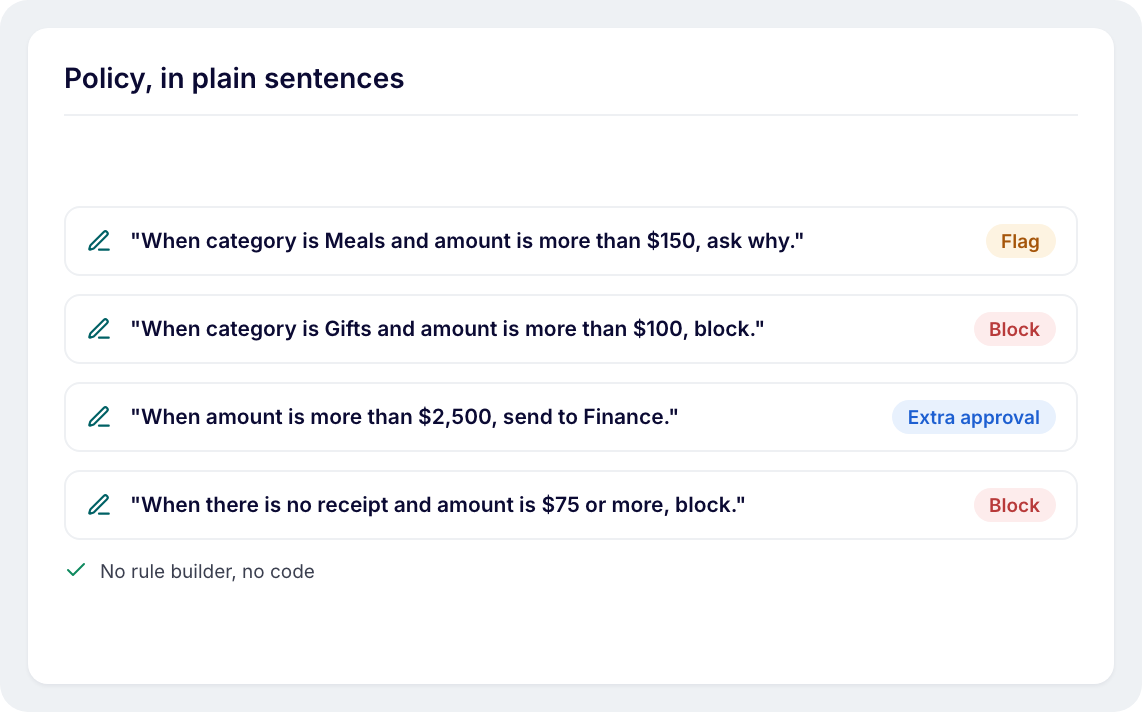
      A business writes its rules as plain sentences, such as "When category is Meals and amount is more than $150, ask why." There is no rule builder to learn and no code to write, so the people who own the policy can set it themselves. This is what makes Centime Spend usable as expense policy management software, not just an enforcement engine.

      A rule can look at the category, the amount, the amount per attendee, the merchant and its type, the card, the department, the day of the week, and the age of the purchase. That range covers the real policies finance actually writes, from per-head meal limits to department rules to how late an expense can be submitted.

        Write your policy as plain sentences
        Outcomes

        Three outcomes: block, flag, or send for extra approval

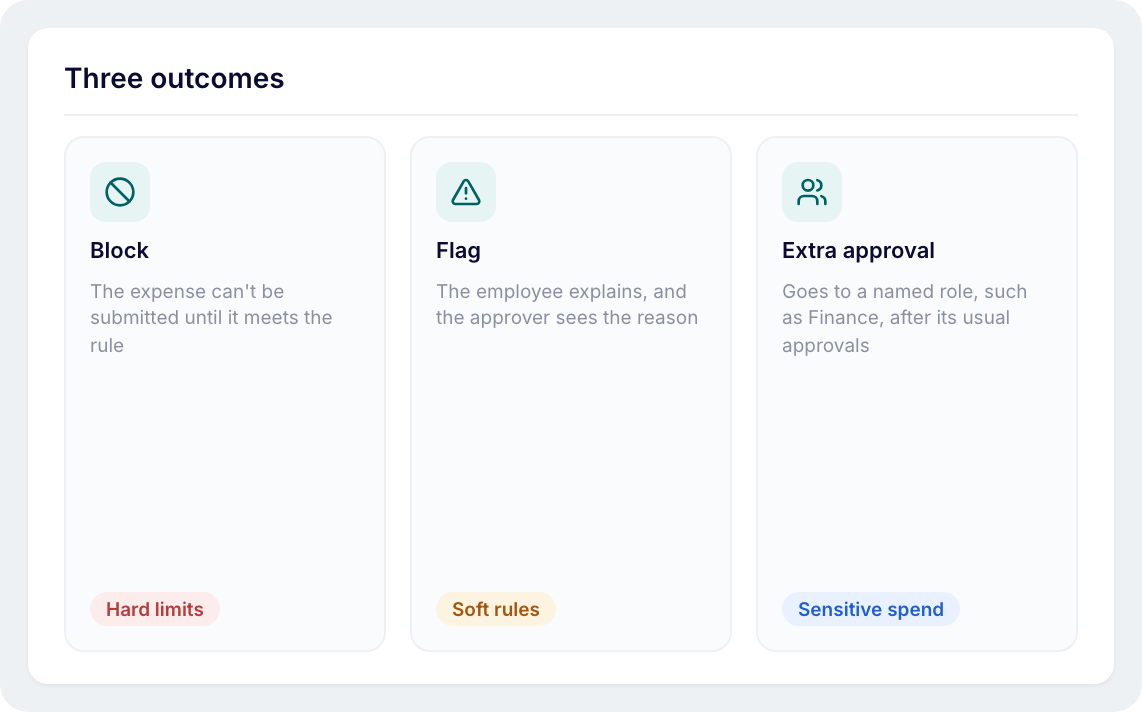
        Each rule has one of three outcomes, so the response fits the rule. Hard limits stop the expense, soft rules ask for an explanation, and sensitive spend gets another set of eyes.

        This is the core of expense policy enforcement: not every rule should block, and not every rule should merely warn. Matching the outcome to the rule keeps policy strict where it matters and practical everywhere else.

        • Block: The expense can't be submitted until it meets the rule
        • Flag: The employee explains, and the approver sees the reason
        • Extra approval: The expense goes to a named role, such as Finance, after its usual approvals
        Three outcomes: block, flag, or send for extra approval
        Pre-Submission

        Checked before the expense is submitted

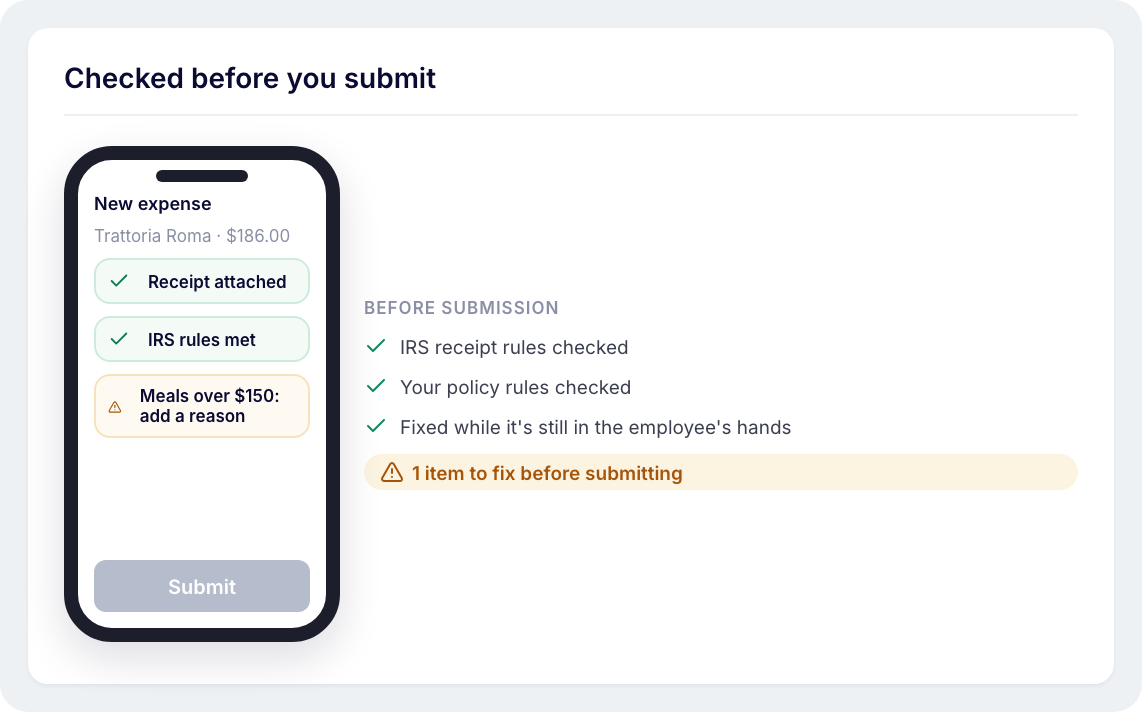
        Before an expense is submitted, Centime Spend checks it against both the IRS receipt rules and the business's own policy. The employee sees the problem while the expense is still in their hands, when it is easy to fix, add the missing explanation, attach the receipt, or correct the amount.

        This is the direct answer to catching out-of-policy expenses only after the fact. Because the check runs before submission, the expense that lands with finance already meets the rules, and the back-and-forth that used to happen at review happens up front instead, if at all.

          Checked before the expense is submitted
          AI Review

          AI reviews every expense against its receipt and policy

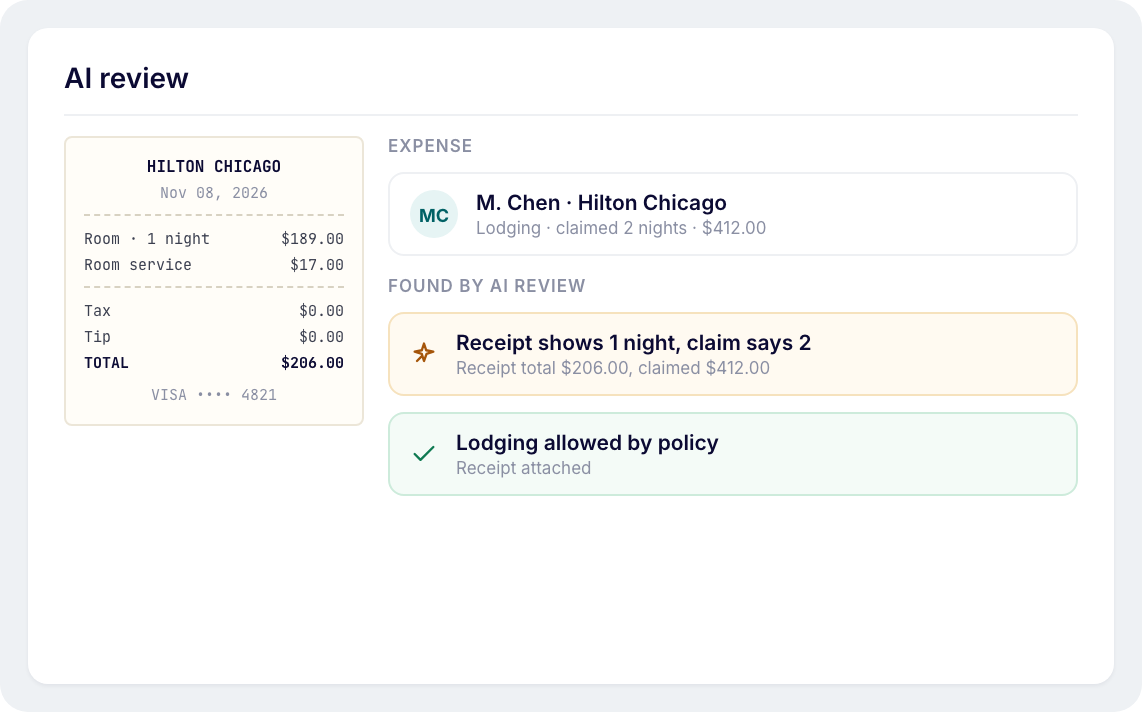
          Each expense is also reviewed by AI against its receipt and the policy, and the approver sees anything that does not match, with the reason. Where a plain-sentence rule catches what it is written to catch, the AI review catches the mismatches a fixed rule would miss, a receipt that does not match the claim, or spend that does not fit the policy.

          That second layer is what makes Centime Spend work as automated expense compliance software. The approver is not left to spot every discrepancy by hand; the mismatches are surfaced for them, with the reason attached.

            AI reviews every expense against its receipt and policy
            Card Controls

            Card-level spend controls that stop a purchase before it happens

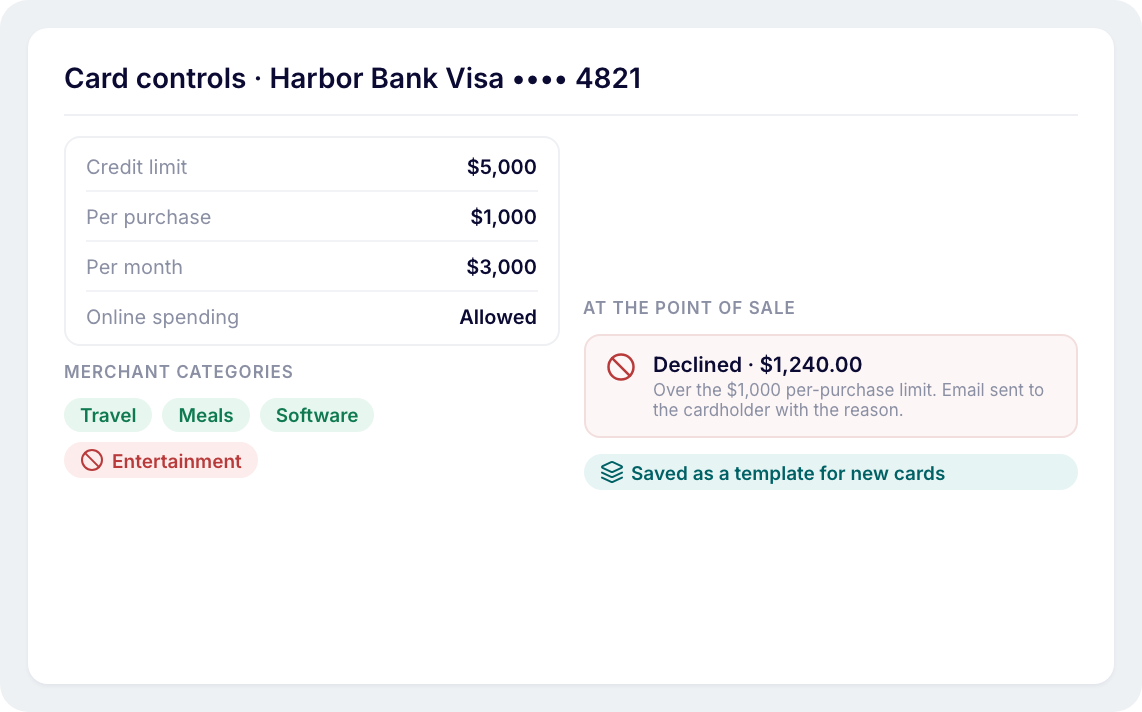
            For card programs that a bank runs through its API, Centime Spend adds a layer of control before the purchase, not just before submission. Administrators set a card's credit limit, its limits per purchase and over time, its online spending, and the merchant categories it can be used at, and a set of these saved as a template can be applied to each new card.

            When a purchase breaks those controls it is declined, and the cardholder gets an email with the reason, which is real-time, pre-transaction expense control on those cards. This is the corporate credit card expense control layer: card limits stop disallowed spend at the point of sale, and policy rules catch everything else before submission. The controls apply to cards a bank runs through its API; cards connected by feed are governed by the policy rules above. Which cards you connect is covered on the bring your own card page.

              Card-level spend controls that stop a purchase before it happens
              Approvals

              Approvals that route themselves

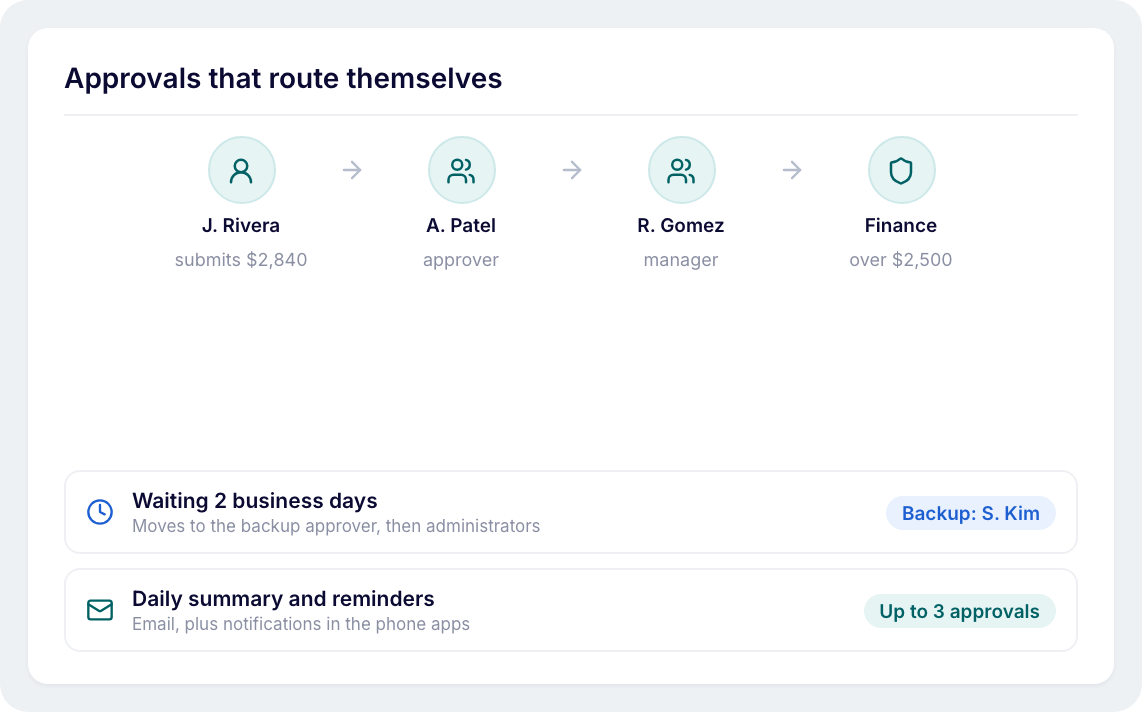
              Enforcement carries into approval. Each employee has an approver and a backup, larger expenses need up to three approvals at amounts the business sets, and further approvals go up the management chain, with Centime Spend skipping anyone who cannot approve, including the employee. An expense left waiting goes to the backup after the number of business days the business sets, and then to the administrators.

              Approvers get an email summary of what is waiting and a reminder before an expense moves on, and on the phone apps these arrive as notifications. The approver reviews each expense with its receipt beside it and works through a batch one at a time, approving, holding, or returning each with a reason. This is the expense approval workflow that carries the enforced policy through to a decision, and expenses that have waited too long appear under Needs attention for an administrator to act on.

                Approvals that route themselves
                How It Works

                How policy enforcement works in Centime Spend

                From a written rule to an approved expense, enforcement runs at three points, before the purchase, before submission, and at approval.

                • Write the rules: Finance writes policy as plain sentences, each set to block, flag, or require extra approval.
                • Stop disallowed card purchases: On cards a bank runs through its API, a purchase that breaks a card's limits or merchant categories is declined with a reason.
                • Check before submission: Each expense is checked against the IRS receipt rules and the policy before it is submitted, and reviewed by AI against its receipt.
                • Route for approval: Compliant expenses route to the right approvers, with flags and extra approvals applied, and nothing stalls thanks to backups and reminders.
                FAQ

                Frequently asked questions

                What is expense policy enforcement software?

                Expense policy enforcement software applies a business's spend rules to each expense automatically, so the policy is checked by the system instead of by people after the fact. In Centime Spend, you write rules as plain sentences, and each expense is blocked, flagged, or sent for extra approval before it is submitted. On cards a bank runs through its API, a purchase that breaks a card's limits is also declined at the point of sale. The result is that out-of-policy spend is stopped or explained up front.

                How does Centime Spend enforce our spend policy automatically?

                Centime Spend enforces your spend policy automatically in three places: card-level controls decline a disallowed purchase on cards a bank runs through its API, policy rules check each expense before it is submitted, and AI reviews each expense against its receipt and the policy. You write the rules as plain sentences, and each has an outcome of block, flag, or extra approval. Finance sets the policy once and the system applies it to every expense. Nobody has to remember the rules on each claim.

                Does Centime Spend check expenses before they're submitted?

                Centime Spend checks each expense before it is submitted, against both the IRS receipt rules and the business's own policy. The employee sees any problem while the expense is still theirs to fix, so the correction happens up front rather than at review. An expense that breaks a blocking rule cannot be submitted until it meets the rule. This is what stops the pattern of catching out-of-policy expenses only after the money is spent.

                How do we write expense policy rules in Centime Spend?

                You write expense policy rules in Centime Spend as plain sentences, such as "When category is Meals and amount is more than $150, ask why." There is no rule builder to learn, so the people who own the policy can set it themselves. A rule can look at the category, amount, amount per attendee, merchant and its type, card, department, day of the week, and age of the purchase. Each rule is set to block, flag, or require extra approval.

                What happens when an expense breaks policy?

                When an expense breaks policy in Centime Spend, one of three things happens, depending on the rule. A block means the expense can't be submitted until it meets the rule, a flag means the employee explains and the approver sees the reason, and extra approval sends the expense to a named role, such as Finance, after its usual approvals. The outcome is set per rule, so hard limits stop spend while softer rules ask for context. That keeps policy strict where it matters and practical elsewhere.

                What is automated expense compliance?

                Automated expense compliance means the software checks each expense against policy and the receipt without a person reviewing every detail. In Centime Spend, plain-sentence rules enforce the written policy, and AI reviews each expense against its receipt and the policy, surfacing anything that does not match with the reason. The approver sees the mismatches rather than hunting for them. Together, the rules and the AI review make compliance automatic rather than manual.

                Can Centime Spend stop out-of-policy card spend before the purchase?

                Centime Spend can stop out-of-policy card spend before the purchase on card programs that a bank runs through its API. Administrators set a card's credit limit, per-purchase and over-time limits, online spending, and merchant categories, and a purchase that breaks them is declined, with the cardholder emailed the reason. This is real-time, pre-transaction control on those cards. For cards connected by feed, policy rules enforce the rules before submission instead.

                How does the expense approval workflow work?

                The expense approval workflow in Centime Spend routes each expense to the right approvers automatically. Every employee has an approver and a backup, larger expenses need up to three approvals at amounts the business sets, and approvals go up the management chain, skipping anyone who cannot approve. An expense left waiting moves to the backup after a set number of business days, then to administrators, with email and app reminders along the way. Approvers review each expense with its receipt beside it and approve, hold, or return it with a reason.

                What is real-time spend control?

                Real-time spend control means stopping or catching spend as it happens rather than afterward. In Centime Spend, there are two layers: on cards a bank runs through its API, a purchase that breaks a card's limits or merchant categories is declined at the point of sale, and for all expenses, policy rules check each one against the policy before it is submitted. The first is pre-transaction control on those cards; the second is pre-submission control on every expense. Both replace catching out-of-policy spend after the fact.

                Enforce your policy before the money is spent

                Centime Spend checks every expense against your policy before it is submitted, blocks, flags, or escalates what breaks a rule, reviews each expense against its receipt with AI, and, on cards a bank runs through its API, declines a disallowed purchase at the point of sale. The policy you write as plain sentences enforces itself.

                It is built for finance teams tired of catching out-of-policy expenses after the fact. See it check expenses against your own policy before they are submitted.