Intuit QuickBooksQuickBooks APQuickBooks AR
Microsoft Dynamics Business CentralMicrosoft Dynamics AP
Oracle NetSuiteNetSuite APNetSuite AR
Sage IntacctSage Intacct APSage Intacct AR

Extract Invoice Data in Seconds—No Templates, No Manual Entry.
View AI-friendly version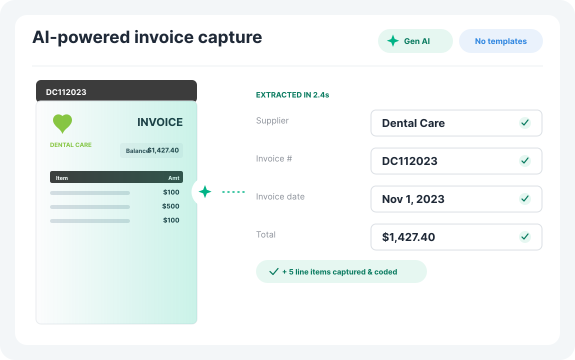
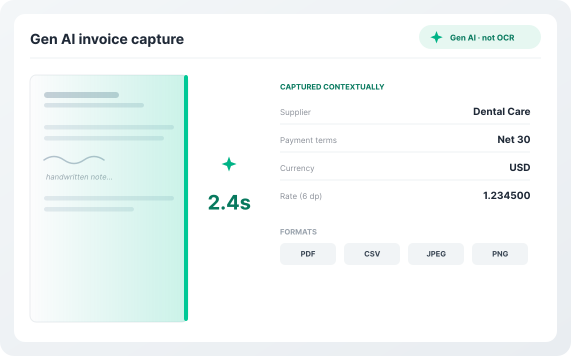
Centime uses a best-in-class Gen AI model, not basic OCR, to power automated invoice data extraction from printed or handwritten invoices. The system processes invoices in seconds and recognizes invoice structure contextually. Captured fields include supplier names, invoice numbers, dates, due dates, payment terms, currency, and complete line-item details including quantities, rates (up to six decimal places), and amounts. Supported formats include PDF, CSV, JPEG, and PNG.
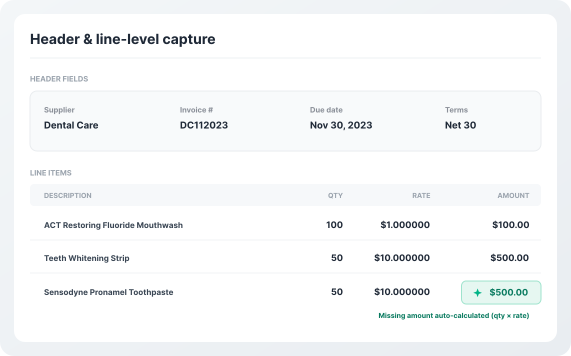
Centime captures the full picture with comprehensive data extraction. If quantity or rate is missing on the original invoice, Centime intelligently calculates the missing value.
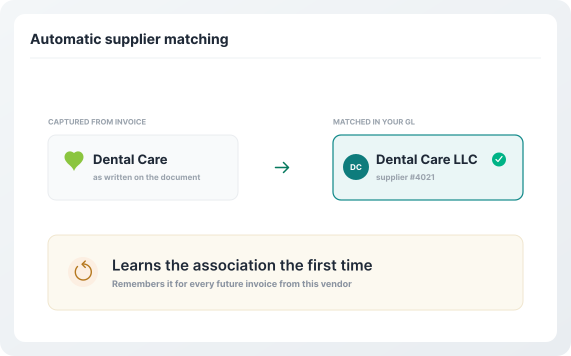
Centime automatically matches the supplier name from the captured document with a supplier in your GL. If names differ slightly, the system learns the association the first time you make a manual selection—and remembers it for all future invoices from that vendor.
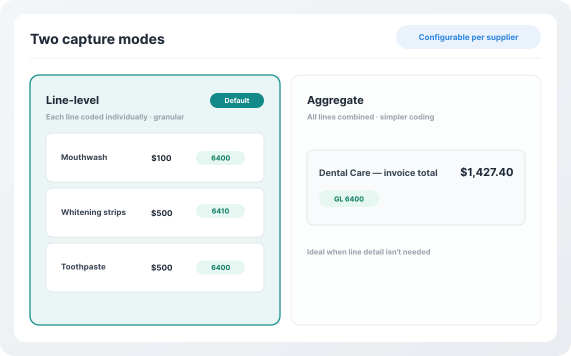
Centime offers flexible capture options configurable per supplier.
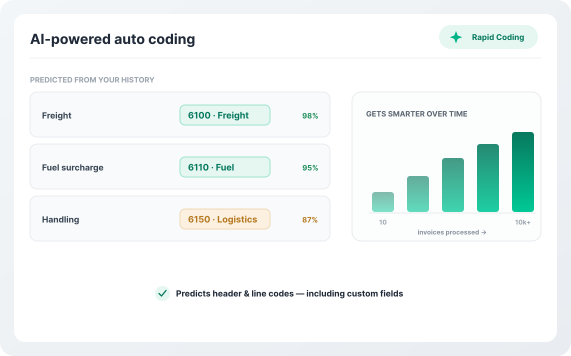
Centime's Rapid Coding system learns from every invoice you process. It predicts header and line-level GL coding based on similar invoices previously processed—including custom fields specific to your business. The more invoices you process, the smarter it gets.
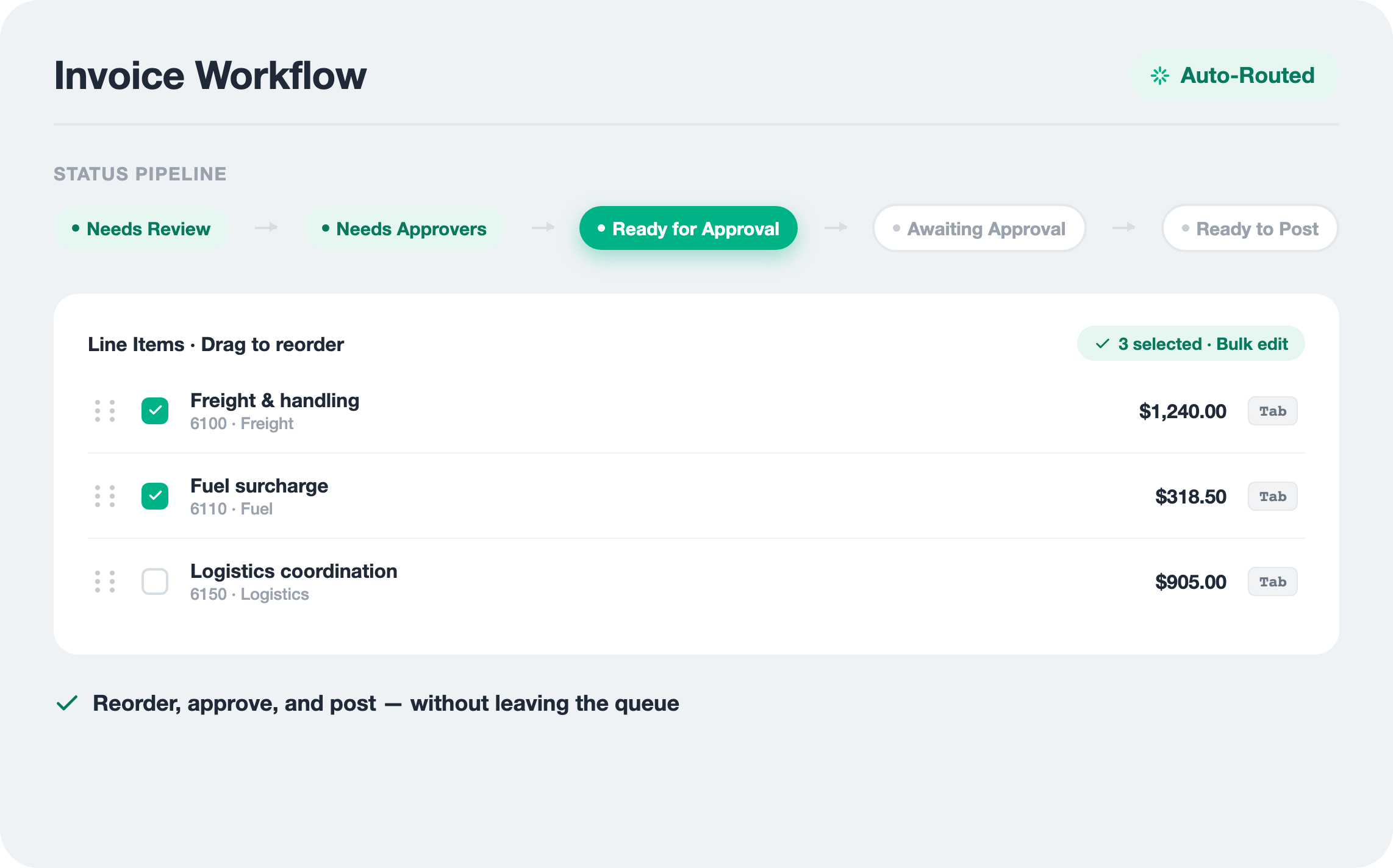
Once captured, invoices flow through a clear status workflow. Users can rearrange expense and item lines via drag-and-drop, navigate between invoices with quick navigation tools, and complete coding with bulk edits and keyboard shortcuts—even for long, complex invoices.
Gen AI captures header and line-level data the moment invoices arrive—no waiting for batch processing or offshore review queues.
Unlike legacy OCR tools that require pre-built templates for each vendor, Centime’s optical character recognition for AP understands invoice structure automatically and adapts to any format.
The system learns from every invoice processed—improving accuracy over time for supplier matching, GL coding predictions, and field recognition.
Fully embedded in Intuit QuickBooks, Oracle NetSuite, and Sage Intacct with real-time sync—extracted data flows directly to your GL without export/import hassles.
Capture full line-level data including descriptions, quantities, rates, and amounts—not just header totals like basic OCR solutions.
| Features | | Other OCR Tools |
|---|---|---|
| AI Technology | Gen AI model that understands any invoice format without templates | Template-based OCR that requires configuration per vendor |
| Line-Level Capture | Complete line-level extraction: description, quantity, rate, amount | Header only or basic totals; line items require manual entry |
| Learning Capability | Learns from every invoice to improve supplier matching and GL coding | Static rules that don't improve over time |
| Processing Speed | Real-time extraction the moment invoices arrive | Batch processing or 24-hour offshore review queues |
| Handwritten Invoices | Gen AI captures handwritten and printed invoices | Cannot interpret handwritten text |
| Supplier Matching | Automatic matching with learned vendor associations | Manual vendor selection for every invoice |
| ERP Integration | Fully embedded in NetSuite, Sage Intacct, and QuickBooks with real-time sync | Sync-based; requires export/import or manual entry |
| Auto Coding | AI predicts header and line-level GL codes from history | No coding prediction; manual GL assignment |
| File Formats | PDF, CSV, JPEG, PNG supported | Limited format support |
| Rate Precision | Captures rates up to 6 decimal places | Rounds or truncates decimal values |
| Multi-Page Invoices | Full multi-page invoice support with complete line-item extraction | Page limits or per-page fees |
| Implementation Time | 7-21 days with dedicated onboarding specialists | 60-90+ days with template configuration |
| Calculated Fields | Intelligently calculates missing quantity or rate values | Requires all values present on invoice |
| Security | SOC 2 certified; encrypted in transit and at rest | Basic encryption |
Centime Invoice Capture (OCR) is part of the broader Centime ecosystem—unifying AP, AR, treasury, and banking into one platform. Every invoice you capture flows seamlessly into approval workflows, payment processing, cash forecasting, and your ERP.
Traditional OCR converts images to text but requires pre-configured templates for each invoice format and struggles with variations. Centime's Gen AI model understands invoice structure contextually—recognizing fields, line items, and relationships without templates. It adapts to any format automatically and improves accuracy over time by learning from your corrections.
Centime extracts both header-level and line-level data. Headers include: supplier name, invoice number, invoice date, due date, currency, and payment terms. Line items include: description, quantity, rate (up to 6 decimal places), and amount. The system also automatically calculates missing values when possible.
Centime currently supports PDF, CSV, JPEG, and PNG file formats. Invoices can be uploaded manually, dragged-and-dropped, or emailed directly to your Centime inbox.
The system automatically attempts to match the supplier name on the invoice with a vendor in your GL. If names differ (e.g., "ABC Corp" vs. "ABC Corporation"), you select the correct vendor once, and Centime remembers the association for all future invoices from that supplier.
Yes. Centime extracts full line-item detail from multi-page invoices without page limits. You can choose between line-level capture (default) for individual line coding, or aggregate capture to combine all lines into a single expense entry.
Centime's Rapid Coding AI predicts GL codes at both header and line levels based on similar invoices you've previously processed. The system learns your coding patterns over time, including custom fields specific to your business. The more invoices you process, the more accurate predictions become.
Centime is SOC 2 certified, meeting strict criteria for security, availability, processing integrity, confidentiality, and privacy. All data is encrypted both in transit and at rest using bank-level encryption standards.
Centime is fully embedded in Intuit QuickBooks, Oracle NetSuite, and Sage Intacct—not bolted on. Extracted invoice data syncs to your ERP in real time, maintaining data consistency and eliminating manual export/import processes. Invoice numbers respect ERP character limits (21 for QuickBooks Online, 20 for QuickBooks Desktop, 45 for NetSuite).
See how Centime captures, codes, and syncs every invoice in real time, on the same platform that connects OCR to your whole AP workflow.