Intuit QuickBooksQuickBooks APQuickBooks AR
Microsoft Dynamics Business CentralMicrosoft Dynamics AP
Oracle NetSuiteNetSuite APNetSuite AR
Sage IntacctSage Intacct APSage Intacct AR

Apply incoming cash automatically, across every payment method, inside your ERP.
View AI-friendly version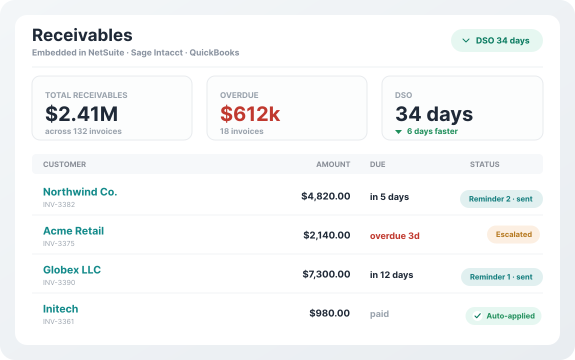
Centime matches incoming payments to the right open invoices without manual work, even when remittance data is messy or missing. The matching engine compares payments against open receivables on invoice number, amount, customer, purchase order, and date, and your finance team sets the tolerance rules that decide what applies automatically.
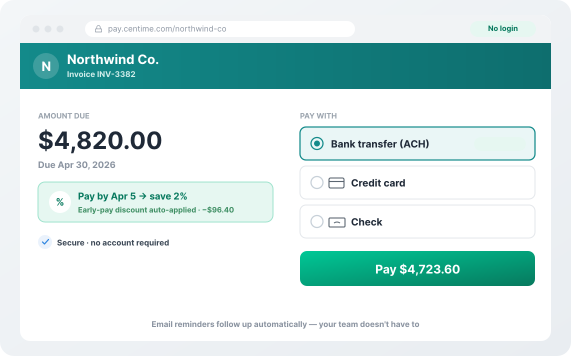
Automation only helps if it covers the whole payment mix. Centime brings ACH, credit card, check, and lockbox remittance into one intake, so the slowest payment method runs through the same process as the fastest. The branded, no-login customer payment portal captures what a payment is for at the moment the customer makes it, which is the cleanest remittance data you can get.
The point of automation is a short queue rather than a full reconciliation workload. Payments Centime cannot match with confidence are routed to a person as true exceptions, each presented with the payment, the candidate invoices, the variance, and the customer's history, so the decision takes seconds instead of an investigation.
A match that never reaches the ERP still leaves the receivable open in the system of record, which is where bolt-on cash application systems tend to leak. Centime runs natively inside Intuit QuickBooks, Oracle NetSuite, Sage Intacct, and Microsoft Dynamics, so applied payments post without re-keying, invoices clear, and the aging report is accurate on the day your team reads it.
Match on invoice number, amount, customer, PO, and date, with tolerance rules your finance team sets.
AR lockbox brings check deposits and remittance stubs into the same automated process as ACH and card.
A branded, no-login portal that records what each payment covers at the moment it is made.
Only true exceptions reach a person, each with the payment, candidate invoices, and variance attached.
Applied cash writes back to Intuit QuickBooks, Oracle NetSuite, Sage Intacct, or Dynamics with no double entry.
Real-time visibility into aging, DSO, and unapplied cash, with a full activity trail.
Cash sitting in the bank but not applied to an invoice distorts everything downstream. The aging report overstates what is outstanding, collectors chase customers who have already paid, and the forecast runs on receivables data that is days behind the bank. Because cash application shares a platform with collections, accounts payable, and the Cash Forecasting Workbench, applied cash updates the forecast as it lands.
The five steps, and what to automate at each one.
Where collections and reconciliation typically break down, and how to fix each one.
The full case for automating accounts receivable, beyond cash application alone.
It matches incoming customer payments to the open invoices they settle and posts the payment to the ledger, clearing the receivable without manual reconciliation.
Yes, through AR lockbox. The check deposit and remittance stub are captured together, so checks run through the same matching as ACH and card.
Best-in-class teams auto-match more than 90% of payments, per industry benchmarks. Your rate depends on payment mix, remittance quality, and rule configuration.
Consolidated payments are allocated across the invoices they cover using configurable logic, including tolerance rules for short pays and deductions.
No. Centime posts applied cash back to Intuit QuickBooks, Oracle NetSuite, Sage Intacct, or Dynamics, which stays your system of record. No separate ledger, no double entry.
An accurate aging report means collections chase only genuinely overdue accounts, which is one reason automated receivables processes tend to lower DSO.
Centime applies incoming cash across ACH, card, check, and lockbox, routes only true exceptions to your team, and posts the result inside Intuit QuickBooks, Oracle NetSuite, Sage Intacct, or Dynamics.