ProductsExpense ManagementCard Reconciliation

Corporate Credit Card Reconciliation Software That Replaces the Month-End Statement Match

Centime Spend is corporate credit card reconciliation software that matches each card charge to its receipt and expense as the charge arrives, rather than leaving finance to match a statement by hand at month-end.

View AI-friendly version
    Book a Demo
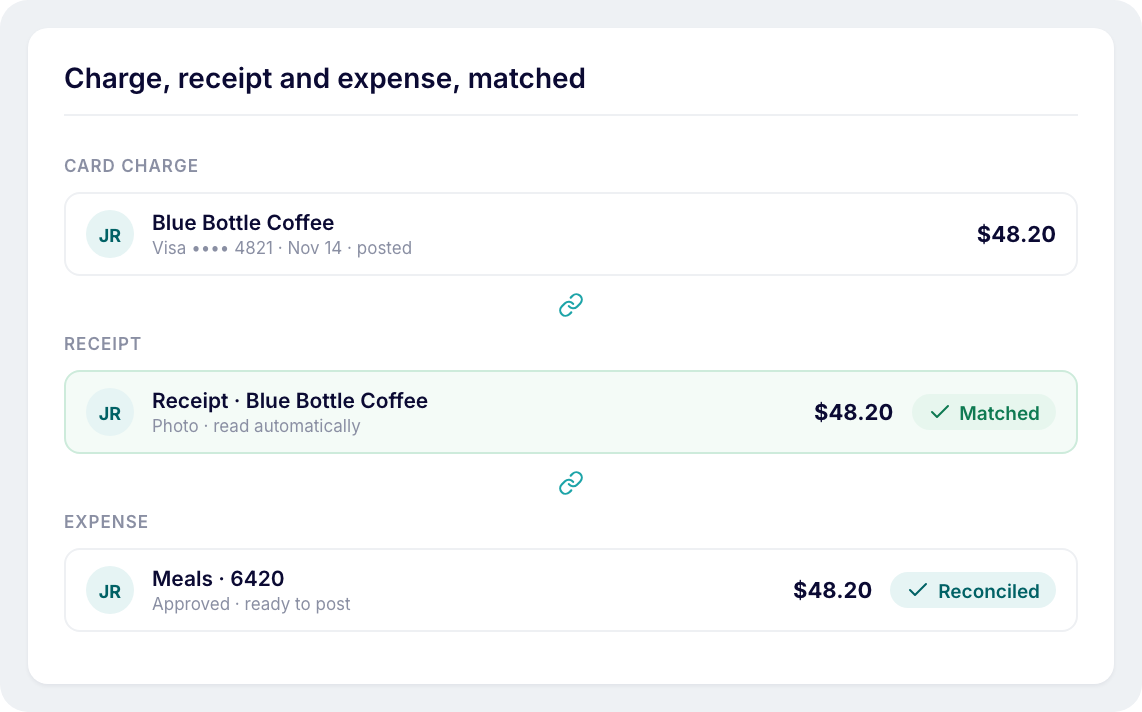
    A card charge matched to its receipt and expense in Centime Spend
    Centime Spend is corporate credit card reconciliation software that matches each card charge to its receipt and expense as the charge arrives, rather than leaving finance to match a statement by hand at month-end. Charges become expenses as soon as they come in, receipts are matched to them, and duplicates, pending charges, and reversals are sorted out on their own.

    For finance, the reconciliation that used to take days each month happens continuously instead. By the time the period closes, charges already sit with the receipts and expenses that explain them. It runs inside Centime Spend expense management, alongside receipt capture, approvals, and posting to your accounting system.
    Why It Matters

    What corporate card reconciliation is, and why it takes finance days

    Corporate card reconciliation is the work of matching every charge on a company card to the receipt and expense that explain it, so the books agree with what was actually spent. Each charge needs a receipt, the right expense record, and a check that it has not been counted twice.

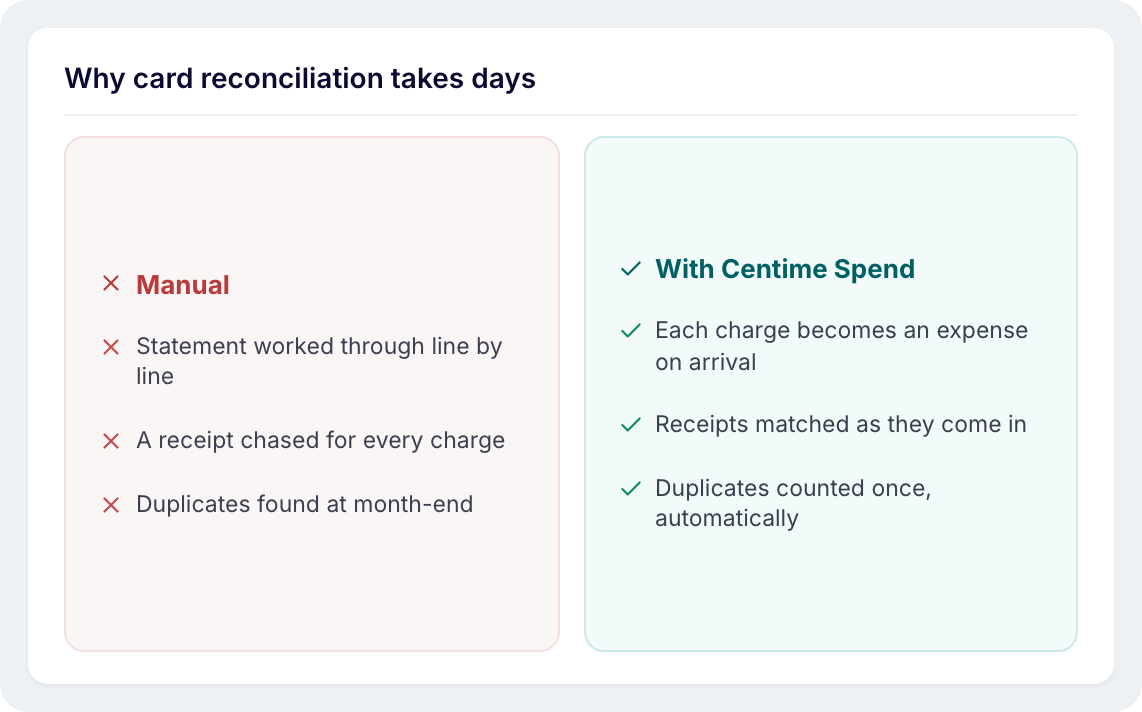
    Done by hand, it piles up. Finance reconciles card statements against expenses and receipts at the end of the month, line by line, which takes days and is where missing receipts and double-counted charges surface too late. Automated credit card reconciliation moves that work to the moment each charge arrives, so there is no backlog to clear at the close.

      What corporate card reconciliation is, and why it takes finance days
      Live Charges

      Charges become expenses as they arrive

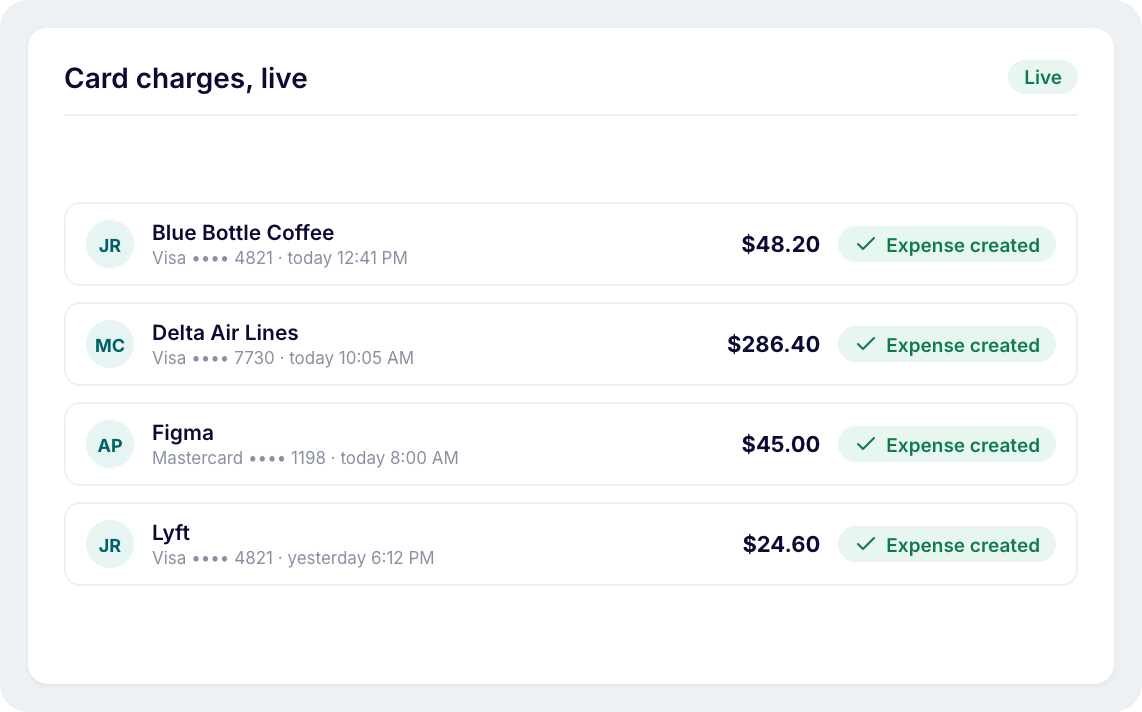
      Charges become expenses as soon as they arrive from the card, through whichever channel the bank offers. That turns reconciliation from a monthly event into a running process: a charge is an expense the day it happens, not a line on a statement weeks later.

      This is also where corporate card spend tracking starts, because spend is visible as it occurs rather than after the statement lands. Centime Spend works with any corporate card from any bank; which cards you connect and how charges come in is covered on the bring your own card page.

        Charges become expenses as they arrive
        Matching

        Every charge matched to its receipt and expense

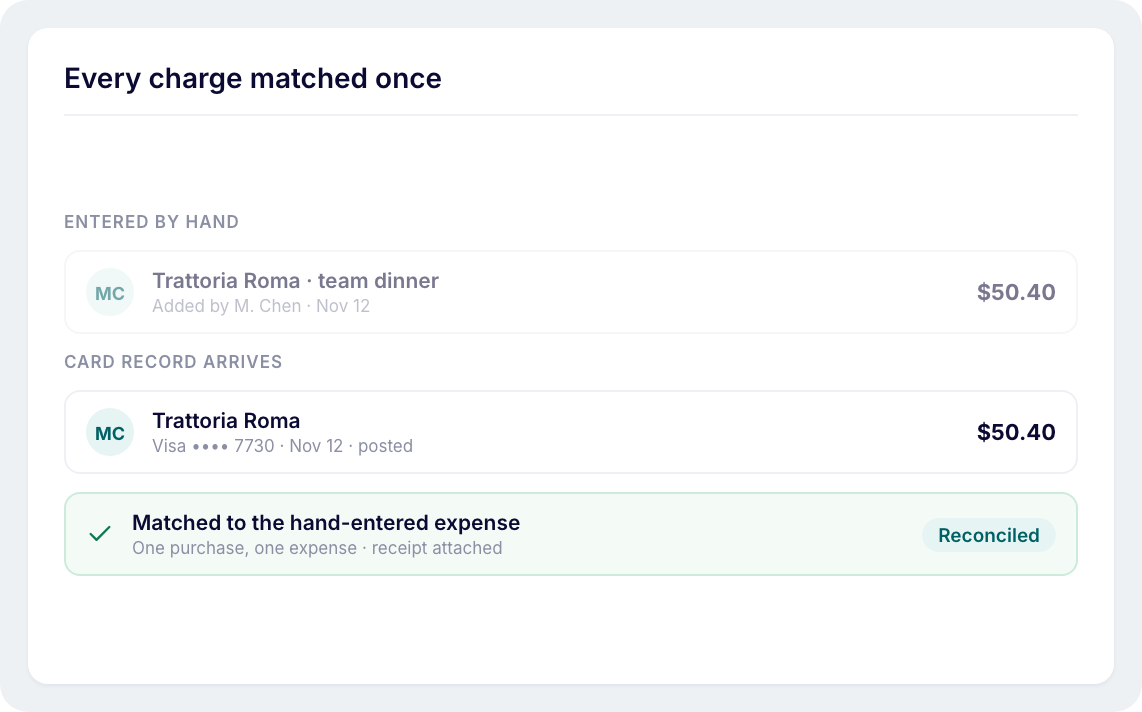
        Centime Spend matches each receipt to its card charge or expense, or starts a new expense from the receipt when there is no charge yet. When an employee has already entered a charge by hand, the incoming card record is matched to it, so the same purchase does not become two expenses. This is corporate credit card to expense matching done as the records arrive.

        The receipt side of that match is handled by automatic receipt capture, which reads each receipt and links it to its charge. The point for reconciliation is that the charge, the receipt, and the expense end up as one record, not three things finance has to line up later.

          Every charge matched to its receipt and expense
          Charge Lifecycle

          Duplicates, pending charges, and reversals sorted on their own

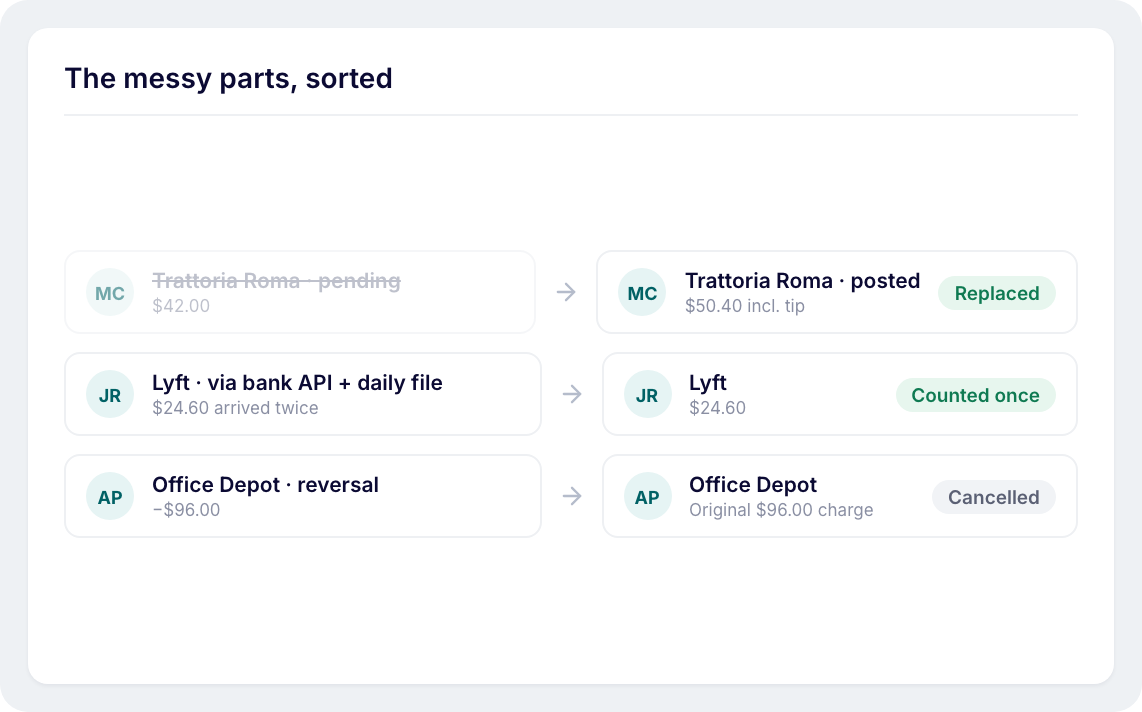
          The messy parts of a card feed clean themselves up. A charge that arrives through two channels is counted once, so connecting a card two ways does not double a purchase. When a pending charge posts, the posted charge replaces it, including a restaurant charge that grows by a tip. A reversal cancels the charge it reverses.

          These are the cases that break manual credit card reconciliation: the same charge from two sources, a pending amount that changes once the tip lands, a refund that has to be netted off. Centime Spend resolves each one automatically, so the expense record matches what the card actually settled.

            Pending, posted, duplicate, and reversed charges resolved to a single clean expense
            Statements

            Reconcile a card statement without matching it line by line

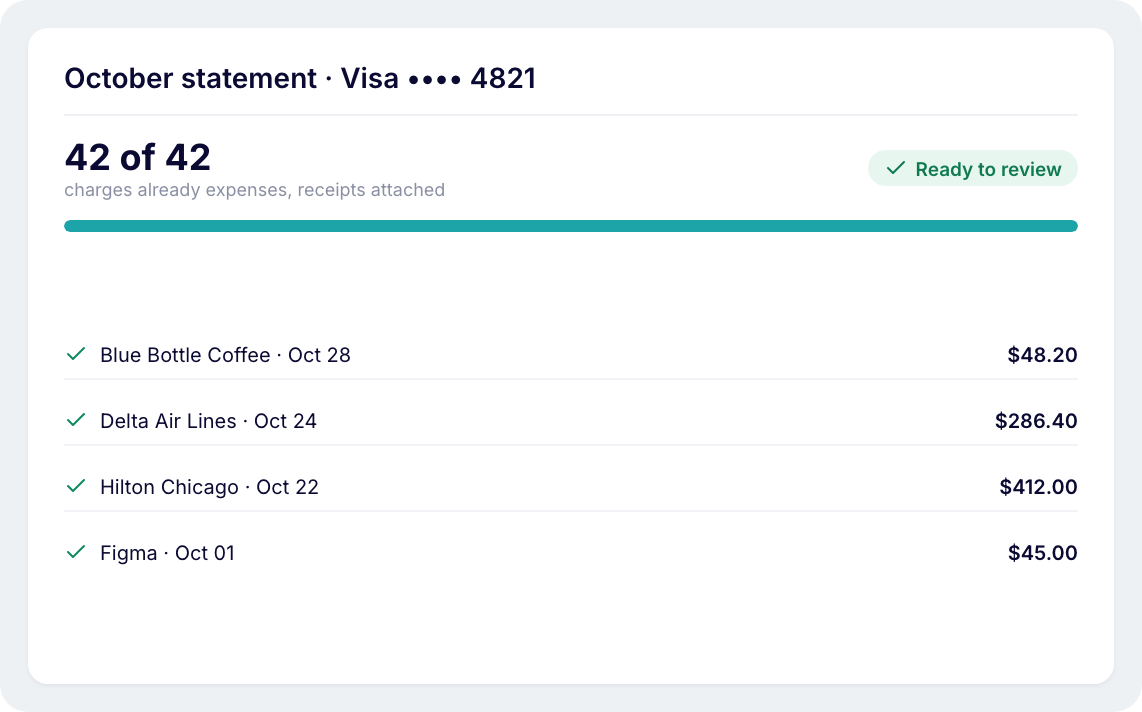
            Because charges become expenses and are matched as they arrive, reconciling a statement no longer means working down it by hand. The charges on the statement are already expenses with their receipts attached, so the credit card statement reconciliation is a review of matched records rather than a line-by-line hunt.

            Even when charges come from an uploaded statement file, they are read in as charges, deduplicated against anything already captured, and matched to their receipts and expenses. The best way to reconcile credit card statements is to not let them pile up in the first place, which is what matching each charge on arrival does.

              Reconcile a card statement without matching it line by line
              ERP Posting

              Reconciled expenses post to your accounting system

              Once an expense is approved, it posts to the accounting system with its coding and its receipt, so the reconciliation carries through to the ledger. For connected systems, Sync status shows what the accounting system confirmed, what is waiting, and what it refused, in the system's own words, so a posting the ledger rejects is visible and can be fixed.

              The posting and the two-way connection are covered on the two-way ERP sync for expense management page. For reconciliation, what matters is that a matched, approved expense lands in the books coded and attached to its receipt.

                Reconciled expenses post to your accounting system
                How It Works

                How card reconciliation works in Centime Spend

                From a swipe to a reconciled expense in the ledger, each charge moves through the same path, and the matching happens as it goes.

                • Charge arrives: The card charge comes in and becomes an expense as soon as it arrives.
                • Receipt matched: The receipt is matched to the charge, or a hand-entered charge is matched to the card's record, so one purchase is one expense.
                • Lifecycle resolved: Duplicates are counted once, a posted charge replaces its pending version including a tip, and a reversal cancels its charge.
                • Approved and posted: The reconciled expense is approved and posts to the accounting system, coded and with its receipt attached.
                FAQ

                Frequently asked questions

                What is corporate card reconciliation?

                Corporate card reconciliation is the process of matching every company card charge to the receipt and expense that explain it, so the books agree with what was spent. It also means checking that no charge is counted twice and that pending charges and reversals are handled. Done by hand against a monthly statement, it takes finance days. In Centime Spend it happens as each charge arrives, so there is no month-end backlog.

                What is the best corporate credit card reconciliation software?

                The best corporate credit card reconciliation software matches charges to receipts and expenses automatically as they arrive, rather than at month-end. Centime Spend does this: charges become expenses as soon as they come in, each receipt is matched to its charge, and duplicates, pending charges, and reversals are resolved on their own. It works with any corporate card from any bank and posts reconciled expenses to your accounting system. That removes the line-by-line statement match finance does each month.

                How does Centime Spend match card charges to receipts?

                Centime Spend matches card charges to receipts by reading each receipt as it arrives and linking it to its card charge or expense, or starting a new expense from it. When an employee has already entered a charge by hand, the card's record is matched to it so the purchase is not counted twice. The charge, the receipt, and the expense become one record. This is corporate credit card to expense matching done as the records come in, not at the close.

                Does it reconcile credit card statements automatically?

                Centime Spend reconciles credit card charges automatically by matching each one to its receipt and expense as it arrives, so the statement is a review of already-matched records rather than a manual match. Charges can come in through a bank connection, a feed, or an uploaded statement file, and a charge that arrives two ways is counted once. Pending charges, tips, and reversals are resolved automatically. That is automated credit card reconciliation rather than a line-by-line check.

                What is the best way to reconcile credit card statements?

                The best way to reconcile credit card statements is to match each charge to its receipt and expense as the charge arrives, so nothing piles up for month-end. In Centime Spend, charges become expenses on arrival, receipts are matched to them, and duplicates and reversals are handled on their own. Reconciling the statement then means reviewing matched records, not hunting line by line. This is what turns a multi-day monthly task into a running process.

                How does automated credit card reconciliation handle pending charges and reversals?

                Automated credit card reconciliation in Centime Spend handles pending charges by replacing a pending charge with the posted charge when it settles, including a restaurant charge that grows by a tip. A reversal cancels the charge it reverses, so a refund nets off correctly. A charge that arrives through two channels is counted once. These are the cases that break a manual reconciliation, and Centime Spend resolves each automatically.

                Does it reconcile charges from our corporate cards from any bank?

                Centime Spend reconciles charges from any corporate card from any bank, because charges become expenses as soon as they arrive through whichever channel the bank offers. You keep your existing cards and bank, and can add the Centime One card if you want one. Which cards you connect and how charges come in is covered on the bring your own card page. However the charges arrive, they are matched to receipts and expenses the same way.

                How does Centime Spend avoid double-counting a card charge?

                Centime Spend avoids double-counting by counting a charge once even when it arrives through two channels, and by matching a hand-entered charge to the card's own record rather than creating a second expense. When a pending charge posts, the posted charge replaces it instead of adding to it. If the same receipt is submitted twice, the approver sees a duplicate warning. Together these keep one purchase as one reconciled expense.

                How long does corporate card reconciliation take with Centime Spend?

                Corporate card reconciliation with Centime Spend happens continuously, as each charge arrives and is matched to its receipt and expense, rather than in a block at month-end. Because duplicates, pending charges, and reversals are resolved automatically, the reconciliation is largely done by the time the period closes. Finance reviews matched records and exceptions instead of matching a statement line by line.

                Close the month without the statement match

                Centime Spend matches every card charge to its receipt and expense as the charge arrives, counts duplicates once, resolves pending charges and reversals, and posts the reconciled expense to your accounting system coded and attached. The month-end statement match becomes a review, not a multi-day task.

                It is built for finance teams that lose days each month reconciling card statements against expenses and receipts. See it match charges to receipts against your own cards and accounting system.