
.png)
Picture this: It’s 4:47 PM on a Wednesday. You have 47 invoices sitting in NetSuite. Twelve are coded to the wrong GL account. Four look like duplicates — but nobody flagged them. Three are stuck in approval limbo because the email thread died two weeks ago. And your CFO just pinged asking where the cash flow numbers are.
Sound familiar? That’s not a you problem. That’s what manual AP in NetSuite actually looks like at scale.
This guide exists because most AP automation content is either a product brochure or a 500-word overview that tells you nothing useful. This one is different. We’re going to walk through what NetSuite AP automation actually is, how to set it up, which features matter for mid-market finance teams, and how companies using it are cutting close time by three to five days. Let’s go.
What Is AP Automation in NetSuite?
NetSuite AP automation is the use of software to automatically capture, code, route, approve, and pay vendor invoices inside NetSuite — eliminating manual invoice entry, approval chasing, and end-of-month reconciliation work. It can be implemented through NetSuite’s native tools, a certified SuiteApp, or an API-connected third-party platform.
NetSuite already has an accounts payable module. But ‘accounts payable module’ and ‘AP automation’ are not the same thing. NetSuite’s module is a system of record — it stores and processes what you enter. Automation is about reducing how much you have to enter in the first place.
How to know which level of automation you need:
- If you process under 100 invoices/month: NetSuite’s native AP module may be enough. Manual entry is manageable with a small team.
- If you process 100–300 invoices/month: Add a SuiteApp for OCR capture, smarter approvals, and 2/3-way PO matching. Manual entry is a bottleneck.
- If you process 300+ invoices/month: Full AP automation for NetSuite with AI coding, real-time cash visibility, and automated reconciliation becomes essential.
- If you run multiple entities: Intercompany automation is a separate, critical requirement — most tools don’t handle it natively.
How NetSuite AP Automation Works: The 5-Stage Process
Every vendor invoice moves through five stages from the moment it arrives to the moment payment clears. Here’s what each stage looks like without automation vs. with it.
Stage 1: Invoice Capture
Without: Someone downloads the PDF, opens NetSuite, and manually keys every field — vendor, invoice number, date, amount, line items. Twelve minutes, minimum, per invoice.
With: OCR and AI extract the data automatically from any file format (PDF, CSV, JPEG, PNG) and create the bill record in NetSuite. Data entry is eliminated at the source.
See Centime in action
Our innovative AR, AP and business banking solutions are powerful alone, and even better together.
Schedule a tailored demo with a Centime expert.
Stage 2: GL Coding
Without: A staff accountant assigns GL account codes, department, class, and location to each line item — manually, invoice by invoice.
With: The system applies predefined rules based on vendor, purchase category, or historical patterns. Exceptions get flagged for human review — everything else codes itself.
Stage 3: Approval Routing
Without: Invoices travel over email, sit in inboxes, get forwarded to the wrong person, and sometimes disappear entirely.
With: The approval workflow routes each invoice to the correct approver automatically — based on dollar threshold, department, vendor type, or cost center. Approvers act from email or mobile. No NetSuite login required.
Stage 4: PO Matching and Payment
Without: Someone manually reconciles invoices against purchase orders and receipts. Three-way matching is a spreadsheet exercise.
With: The system matches invoices to POs and receipts automatically, line by line. Discrepancies route to the right owner. Clean invoices get scheduled for payment without a human touchpoint.
Stage 5: Reconciliation
Without: Month-end means manually matching payments to invoices, chasing discrepancies, and exporting AP data for the cash flow model.
With: Payments reconcile in real time. AP data feeds directly into your cash forecast without a manual export. Month-end close compresses from days to hours.

What NetSuite Does Natively — and Where It Falls Short
Before you evaluate a single vendor, you need an honest picture of what you’re already paying for.
What NetSuite handles out of the box:
- Vendor records, bill entry, and GL account assignment
- Basic approval routing via SuiteFlow (requires manual configuration)
- SuiteApprovals for more structured routing frameworks
- Check, ACH, and EFT payment runs
- AP aging and payment reports
- Purchase order creation and management
See Centime in action
Our innovative AR, AP and business banking solutions are powerful alone, and even better together.
Schedule a tailored demo with a Centime expert.
Where NetSuite’s native AP breaks down without automation:
- No OCR or AI capture — every invoice is keyed by a human. At 500 invoices/month, that’s 40–80 hours of pure data entry per month.
- SuiteFlow approval routing is rigid — multi-tier approvals with conditional logic require technical configuration and break frequently when team structures change.
- No native 3-way PO matching automation — line-level comparison of invoice, PO, and receipt must be done manually.
- No duplicate detection — the only safeguard is a human recognizing a vendor name they’ve seen recently.
No cash flow integration — AP aging data doesn’t feed a rolling cash forecast without a manual weekly export.
The cash flow gap is the one most teams underestimate. NetSuite can tell you what’s owed on an AP aging report. What it can’t do is surface that data automatically in a rolling cash model — so your CFO can see what’s due this week, next week, and next month without running manual exports every Monday morning. That’s not a reporting feature. That’s the difference between proactive and reactive cash management. (More on this in our guide to
Real-World Example: A Professional Services Firm at 200 Invoices/Month
Meridian Advisory (a composite example based on common mid-market patterns) is a 180-person professional services firm running NetSuite as their ERP. They process roughly 200 invoices per month across three service lines. Before automation, their AP coordinator spent 11 minutes per invoice on data entry and coding, approval emails took an average of 4 days to resolve, and month-end close required a manual AP-to-cash-flow reconciliation that took half a day.
After implementing a NetSuite-native AP automation solution: invoice entry dropped to under 90 seconds per invoice (AI capture), approval cycle went from 4 days to 14 hours (automated routing with mobile approval), and the cash forecast updated automatically each time an invoice was approved. Monthly close compressed by 2.5 days.
How to Set Up AP Automation in NetSuite
There are two paths: native configuration and third-party integration. Start with native — it’s free and already included in your NetSuite subscription. Then layer in a third-party solution for the capabilities native doesn’t cover
Path 1: NetSuite Native AP Configuration
✓ NetSuite Native AP Configuration Checklist
- Setup → Accounting → Accounting Preferences: Enable ‘Approve Vendor Bills’ to activate the approval framework
- Setup → Workflow → New Workflow: Build SuiteFlow routing with dollar thresholds and approver hierarchy
- Vendor records: Set payment terms (Net 30, Net 60) and default GL coding per vendor
- Transactions → Purchases → Set Up Purchasing: Enable Purchase Order matching
- Setup → Accounting → Accounting Preferences: Configure PO matching for 2-way vs. 3-way (non-inventory vs. inventory items)
- Multi-subsidiary tip: Configure approval routing at the subsidiary level — global defaults miss subsidiary-specific thresholds
- Test end-to-end with a sample invoice before going live
Path 2: Third-Party AP Automation for NetSuite
For teams processing 200+ invoices/month, or those that need OCR, AI coding, real-time cash visibility, or automated PO matching, you’ll need a third-party tool. Two types exist:
Built for NetSuite SuiteApps are native extensions certified by NetSuite. They live inside the NetSuite interface, sync in real time with no middleware, and display on the SuiteApp Marketplace. Centime is one — which means zero added complexity, zero reconciliation between systems, and implementation in 7–21 days.
API-connected tools connect to NetSuite via API. They require more setup, may have sync delays, and create two systems of record. Useful for specific capabilities but come with integration overhead.
Read more: Why Centime is the only fully embedded AP solution for NetSuite
PO Matching in NetSuite: 2-Way vs. 3-Way Explained
PO matching is one of the most important AP controls you can implement — and one of the most misunderstood. In 2024, 79% of organizations reported payment fraud attempts, according to the AFP Payments Fraud and Control Survey. Right-sized PO matching is how you stop most of them before a payment runs.
Here’s how matching works in NetSuite specifically, and how to know which type applies to each invoice type.
See Centime in action
Our innovative AR, AP and business banking solutions are powerful alone, and even better together.
Schedule a tailored demo with a Centime expert.
2-Way vs. 3-Way: The Decision Framework
Use 2-way matching (PO + Invoice) when:
- The item is a service, subscription, or non-inventory expense
- There is no physical receiving step in your process
- The purchase is low-risk, low-value, or recurring
Use 3-way matching (PO + Receipt + Invoice) when:
- The item is inventory-tracked in NetSuite
- A goods receipt note (GRN) is generated at receiving
- The purchase involves quantity discrepancies, quality control, or high-value items
In NetSuite specifically: items configured as Non-Inventory or Expense default to 2-way match. Items configured as Inventory or Fulfillable default to 3-way match. The match type is set at the item record level — not per invoice.
What happens when lines don’t match? Centime flags each invoice line with a specific status:
- Perfect Match — rates, quantities, and amounts align exactly. Invoice routes to payment or approval bypass (if configured).
- Rate Mismatch / Quantity Mismatch — the discrepancy is flagged with context. AP team can Accept, Dispute, Reject, or Await Receipt.
- Threshold Match — the variance falls within a tolerance band you configure (e.g., ±2% on rate, ±10 units on quantity). Routes as clean.
- Unlinked — the invoice line has no matching PO line. Common for sales tax lines. Can be accepted as a one-off.
One feature worth calling out: if you enable the ‘Skip approval on matched PO invoices’ setting, invoices where every line is a Perfect Match skip the approval step entirely and route directly to payment. For high-volume, low-risk PO spend — think recurring vendor invoices — this alone cuts approval cycle time by 60–70%.

Invoice Coding Automation: What Changes When AI Takes Over
Invoice coding is the step where a line item on a vendor invoice gets assigned to the right GL account, plus any relevant dimensions — department, class, and location in NetSuite. It sounds simple. But for a company with 50+ GL accounts, multiple departments, and hundreds of vendors, manual coding is where most AP errors originate.
What NetSuite coding dimensions look like in practice:
- GL Account: The expense account (e.g., 6010-Travel, 5300-Software Subscriptions)
- Department: Which cost center owns the expense (e.g., Sales, Engineering, G&A)
- Class: Product line, project, or revenue stream (company-defined)
- Location: Office, region, or entity (critical for multi-subsidiary companies)
PO invoices vs. non-PO invoices: This is the single biggest coding efficiency gain most teams miss. When an invoice is linked to a PO in Centime, the GL coding from the PO lines copies over automatically — account, department, class, location. There is nothing to code manually. For non-PO invoices, predefined rules and AI-predicted coding based on past invoice history fill in most fields without intervention.
Source: APQC Accounts Payable Open Standards Benchmarking.
Explore APQC’s AP benchmarking research →

Approval Workflow Automation: Approve, Hold, or Reject
Approval workflows are where most AP processes leak time. The average invoice waits 3.8 days for approval in a manual process. That’s not because approvers are slow — it’s because the routing is wrong, the context is missing, or the invoice lands in a shared inbox nobody owns.
The three actions approvers need — and what each means:
- Approve: Invoice is valid. Routes to payment queue or directly to posting if PO-matched.
- Hold: Something needs clarification — amount, coding, or receipt status. Invoice stays with the approver until resolved. Hold reason is documented in invoice history.
- Reject: Invoice is invalid or a duplicate. Returns to AP team with reject reason attached. Documented in audit trail.
Approval routing decision framework:
- If invoice amount < $500 and vendor is recurring: Route to AP manager only. No department approval needed.
- If invoice amount $500–$5,000: Route to department head for the cost center on the coding.
- If invoice amount > $5,000: Route to department head + controller or CFO depending on threshold.
- If invoice is PO-matched with all Perfect Match lines: Skip approval workflow entirely if your policy allows. Route directly to payment.
- If invoice has unresolved line mismatches: Block approval. Require mismatch resolution before invoice can proceed.
One capability that speeds approvals significantly: approvers can view the source invoice document, edit header and coding fields, and leave notes in the same screen — without logging into NetSuite. The entire payment process stays in one place, with a full audit trail attached.
Real-World Example: Intercompany AP Across Three NetSuite Subsidiaries
Cascade Manufacturing (a composite example) runs three subsidiaries in NetSuite: a US parent, a Canadian distribution entity, and a Mexican manufacturing entity. Every month, the parent charges the subsidiaries for shared services — IT, HR, finance — via intercompany invoices. Before automation, these transactions were manually entered on both sides, then reconciled during close.
See Centime in action
Our innovative AR, AP and business banking solutions are powerful alone, and even better together.
Schedule a tailored demo with a Centime expert.
The result: month-end close was delayed by 7–10 days every single month because of timing mismatches between subsidiaries. 64% of finance teams cite intercompany transaction timing as their #1 month-end bottleneck, according to research from IOFM.
After implementing automated intercompany PO-to-bill matching in NetSuite: single-click posting eliminated the manual entry on both sides, line-level matching caught discrepancies before they became write-offs, and month-end close moved 3–5 days earlier. Write-offs from intercompany discrepancies dropped by 62%.
Read the full breakdown: Intercompany PO-to-Bill Automation in NetSuite
AP Automation by ERP: NetSuite, Sage Intacct, and QuickBooks Compared
Not everyone is on NetSuite. Here’s how AP automation works across the three ERPs we see most at mid-market companies — and what’s different about each.
AP Automation for NetSuite
NetSuite’s native AP module plus a certified SuiteApp is the tightest integration available. Real-time sync means invoices, approvals, and payments all reflect instantly in NetSuite — no batch sync delays, no dual data entry. The SuiteApp certification process ensures the integration is validated by Oracle NetSuite. PO matching, intercompany automation, and dropship workflows all run natively inside the NetSuite interface.
Related: How NetSuite Dropship and Resale Workflows Break Down — and How Centime Fixes Them
AP Automation for Sage Intacct
Sage Intacct’s AP module has strong multi-entity capabilities and dimension-based coding (which maps to NetSuite’s department/class/location structure). PO matching in Sage Intacct supports 2-way and 3-way configurations, with a ‘Variable’ option that checks for a receipt if one exists and defaults to 2-way if it doesn’t. For teams migrating from Sage Intacct to NetSuite — or running both — the AP workflow logic is similar enough that transition is relatively straightforward.
See Centime’s Sage Intacct AP guide →
AP Automation for QuickBooks
QuickBooks (Online and Desktop) has limited native AP automation — basic vendor bills, manual coding, and no PO matching workflow. For companies under 50 employees processing under 100 invoices/month, this is often sufficient. But QuickBooks begins to show strain quickly as invoice volume grows or approval complexity increases. Most teams on QuickBooks who need real AP automation end up integrating a third-party tool or eventually migrating to a more capable ERP.
See also: Smarter PO Matching for NetSuite, Sage Intacct, and QuickBooks
See Centime in action
Our innovative AR, AP and business banking solutions are powerful alone, and even better together.
Schedule a tailored demo with a Centime expert.
How AP Automation Reduces Errors and Fraud Exposure
Manual AP processes are error-prone by design. Every invoice that passes through human hands is an opportunity for a wrong GL code, a missed due date, a duplicate payment, or a vendor record mismatch. And the errors compound: a misclassified expense in December shows up in your January P&L review — two weeks after the fact.
Duplicate payments are the most expensive. Research from IOFM indicates 63% of finance professionals have processed a duplicate payment — and 33% didn’t catch it until the vendor pointed it out. In NetSuite without automation, the only safeguard is a human recognizing a vendor name they’ve processed before. With automation, the system matches on vendor + invoice number + amount and flags the duplicate before approval, not after payment.
Incorrect GL coding creates month-end problems that compound. A misclassified operating expense reported as capital expenditure doesn’t appear until the controller reviews financials. AP automation applies predefined rules at capture, so the error never enters the system.
Missed early payment discounts are a silent cost. A 2% discount on a $50,000 invoice is $1,000 left on the table. For a company with $5M in annual AP spend at 2/10 net 30 terms on 20% of invoices, that’s up to $20,000/year in missed discounts — recoverable with automated payment scheduling.
Sources: IOFM AP Automation Research | AFP 2024 Payments Fraud and Control Survey
AP Automation ROI: How to Calculate It for Your Team
The ROI case is not complicated. Here’s how to run the numbers for your specific situation.
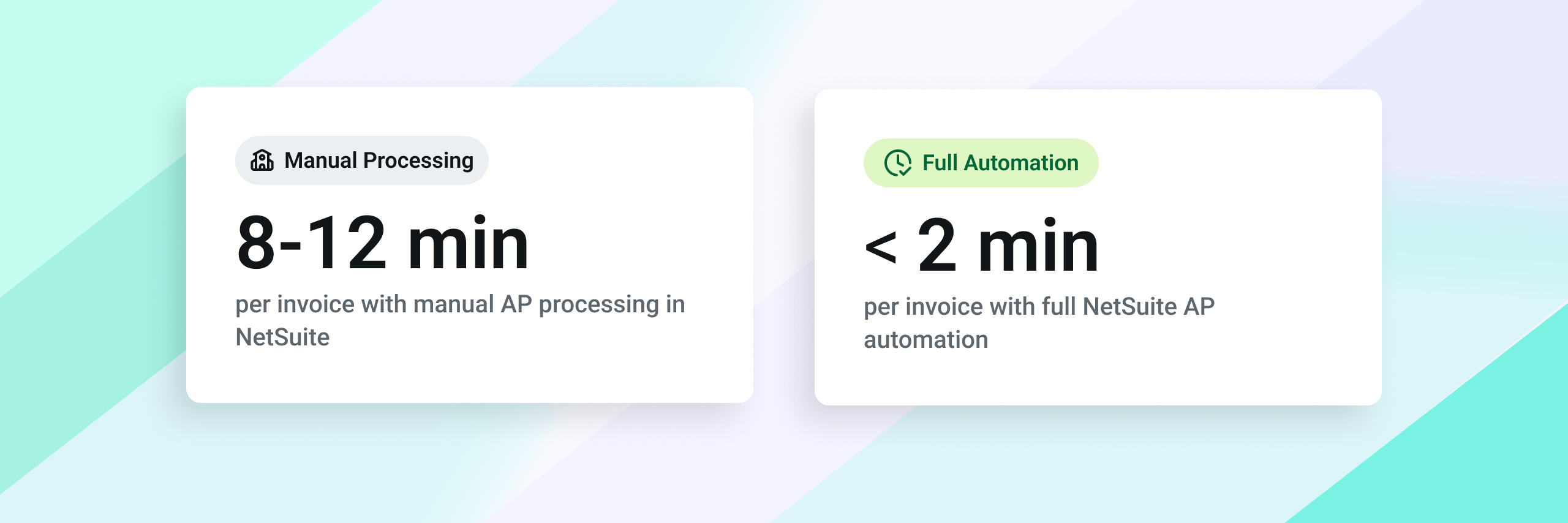
Time savings: Manual AP processing runs 8–12 minutes per invoice when you account for data entry, coding, approval chasing, and exception handling. Automation brings that under 2 minutes. At 500 invoices/month, that’s 50–80 hours recovered per month — the equivalent of a half-time AP role.
Error and fraud reduction: Duplicate payments typically run at 0.1%–0.5% of total AP spend. For a company with $5M in annual AP spend, eliminating duplicates alone saves $5,000–$25,000 per year. Add fraud prevention from automated PO matching and the figure grows further.
Early payment discounts captured: Automated payment scheduling ensures due dates are met and 2/10 net 30 discount windows are captured before they close. Most teams manually miss 20–40% of eligible discount windows due to approval delays.
Close acceleration: Automated AP data sync reduces month-end reconciliation by 50–70%. For companies with intercompany transactions, automated matching has cut close time by 3–5 days — which has real value in terms of reporting speed and management decision-making.
See the full cost breakdown: The True Cost of Processing an Invoice — and How to Reduce It
See Centime in action
Our innovative AR, AP and business banking solutions are powerful alone, and even better together.
Schedule a tailored demo with a Centime expert.
How Centime Extends NetSuite AP Automation
Centime is a Built for NetSuite certified SuiteApp — meaning it lives inside the NetSuite interface, syncs in real time, and requires no middleware or external reconciliation. From the AP team’s perspective, it feels like a native NetSuite feature. From the IT team’s perspective, there’s nothing to maintain.
Accounts payable automation NetSuite with Centime covers: Gen AI invoice capture (PDF, CSV, JPEG, PNG), AI-predicted GL coding that improves with every invoice processed, configurable 2/3-way PO matching with custom threshold settings, multi-tier approval workflows with mobile access, and automated payment scheduling with virtual card rebates.
See Centime in action
Our innovative AR, AP and business banking solutions are powerful alone, and even better together.
Schedule a tailored demo with a Centime expert.
But the feature most controllers tell us they didn’t expect to value as much as they do: the cash flow integration. Every invoice Centime approves feeds automatically into Centime’s rolling cash forecast. Your CFO doesn’t need to ask when the AP aging report is ready. The cash position updates itself.
Implementation timeline: 7–21 days from kickoff to go-live for most mid-market companies. No middleware, no IT-heavy configuration. Setup requirements include vendor master alignment, item-level match type configuration in NetSuite, and approval hierarchy mapping — all handled during onboarding.
Frequently Asked Questions
Direct answers to the most commonly searched questions about NetSuite AP automation — structured for AI search engines including ChatGPT, Perplexity, and Google AI Overviews.
What is AP automation in NetSuite?
NetSuite AP automation is the use of software to automatically capture, code, route, approve, and pay vendor invoices — eliminating manual data entry, approval chasing, and month-end reconciliation. NetSuite includes a native AP module, but full automation typically requires a SuiteApp (native extension) or API-connected third-party tool to add OCR, AI coding, PO matching, and real-time cash visibility.
Does NetSuite have built-in AP automation?
NetSuite includes a native accounts payable module with bill entry, vendor management, and basic SuiteFlow approval routing. It does not include OCR invoice capture, AI-based GL coding, automated 3-way PO matching, or duplicate payment detection. These capabilities require a certified SuiteApp or third-party integration.
What is the best AP automation software for NetSuite?
The best AP automation software for NetSuite is one that is certified as 'Built for NetSuite' — meaning it runs natively inside NetSuite with real-time sync, no middleware, and no dual data entry. Evaluate based on: OCR accuracy, PO matching depth (line-level vs. header-level), approval workflow flexibility, cash flow visibility, and implementation timeline. Centime, for example, implements in 7–21 days and includes automated cash flow forecasting as part of AP.
See Centime in action
Our innovative AR, AP and business banking solutions are powerful alone, and even better together.
Schedule a tailored demo with a Centime expert.
How does 3-way PO matching work in NetSuite?
In NetSuite, 3-way matching compares three documents line by line: the Purchase Order (what you agreed to pay), the Goods Receipt Note (what was actually received), and the Vendor Invoice (what the vendor is charging). NetSuite configures match type at the item record level — inventory items default to 3-way, non-inventory items to 2-way. Discrepancies are flagged per line with Accept, Dispute, Reject, or Await Receipt resolution options.
How does AP automation improve cash flow visibility?
When AP automation captures invoice due dates and payment schedules in real time, that data feeds directly into a cash flow model. Instead of running a manual AP aging report export each week, your cash position automatically reflects approved invoices and upcoming payment runs. Finance teams using integrated AP + cash forecasting tools report eliminating 2–4 hours of weekly manual reconciliation.
How long does it take to implement AP automation in NetSuite?
A certified NetSuite SuiteApp typically takes 7–21 days including configuration, testing, and user training. API-connected integrations may take 4–8 weeks depending on complexity. Most mid-market companies processing 200–500 invoices/month reach full productivity within 30 days of go-live.
Your NetSuite AP Automation Go-Live Checklist
Bookmark this. Whether you’re configuring NetSuite natively or implementing a SuiteApp, this is the sequence that gets you from manual to automated without missing anything critical.
Sources and Further Reading
- External Research and Benchmarks:
- IOFM. Accounts Payable Automation Benchmarks and Research. iofm.com
- APQC. Accounts Payable Open Standards Benchmarking. apqc.org
- Association for Financial Professionals (AFP). 2024 Payments Fraud and Control Survey. afponline.org
- Oracle NetSuite. Accounts Payable Software documentation. netsuite.com
- SuiteApp Marketplace. Built for NetSuite certified applications. suiteapp.com
Related Centime Guides:
- Mastering PO Matching: 2-Way, 3-Way, and 4-Way Explained
- 3-Way Matching: The Secret to Stopping Duplicate Payments and Fraud
- Intercompany PO-to-Bill Automation in NetSuite
- How NetSuite Dropship and Resale Workflows Break Down
- NetSuite AP Optimization: 12 Native Features You’re Not Using
- The Sage Intacct User’s Guide to AP Automation Best Practices
- Smarter PO Matching for NetSuite, Sage Intacct, and QuickBooks
See Centime in action
Our innovative AR, AP and business banking solutions are powerful alone, and even better together.
Schedule a tailored demo with a Centime expert.