
.png)
Your vendor wants a deposit before they'll start on a $30,000 order. Easy enough, right? You cut the check, record it somewhere, and figure you'll sort it out when the invoices come in.
Three months later, your controller is reconciling vendor statements and can't figure out why the balance doesn't match. The prepayment got applied to the wrong invoice. Or it didn't get applied at all. Or someone applied it twice because they didn't know their colleague already handled it.
This scenario plays out constantly in mid-market companies running NetSuite, Sage Intacct, or QuickBooks. The vendor relationship is fine. The products arrive on time. But the accounting behind blanket POs and prepayments? That's where things get messy.
See Centime in action
Our innovative AR, AP and business banking solutions are powerful alone, and even better together.
Schedule a tailored demo with a Centime expert.
The Blanket PO Problem Nobody Talks About
Blanket purchase orders solve a real operational problem. Instead of generating a new PO every time you need office supplies or raw materials from a recurring vendor, you establish a single agreement covering multiple deliveries over time. The Order.co research team found that these agreements reduce administrative burden significantly by consolidating what would otherwise require dozens of separate approval workflows into one upfront process.
But here's what procurement software vendors won't tell you: the blanket PO itself is the easy part. The hard part comes when you've made prepayments against that blanket PO, the vendor starts delivering in phases, and your AP team has to match invoices against partial receipts while correctly applying prepayment credits.
Consider what actually happens in your ERP when you create a blanket PO for $30,571.10 with a vendor like Coopervision (a real example from the workflow documentation). That blanket PO might spawn three separate sub-POs: one for $6,972.90, another for $15,698.20, and a third for $7,900.00. Each sub-PO represents a scheduled delivery. Each will eventually generate its own invoice from the vendor.
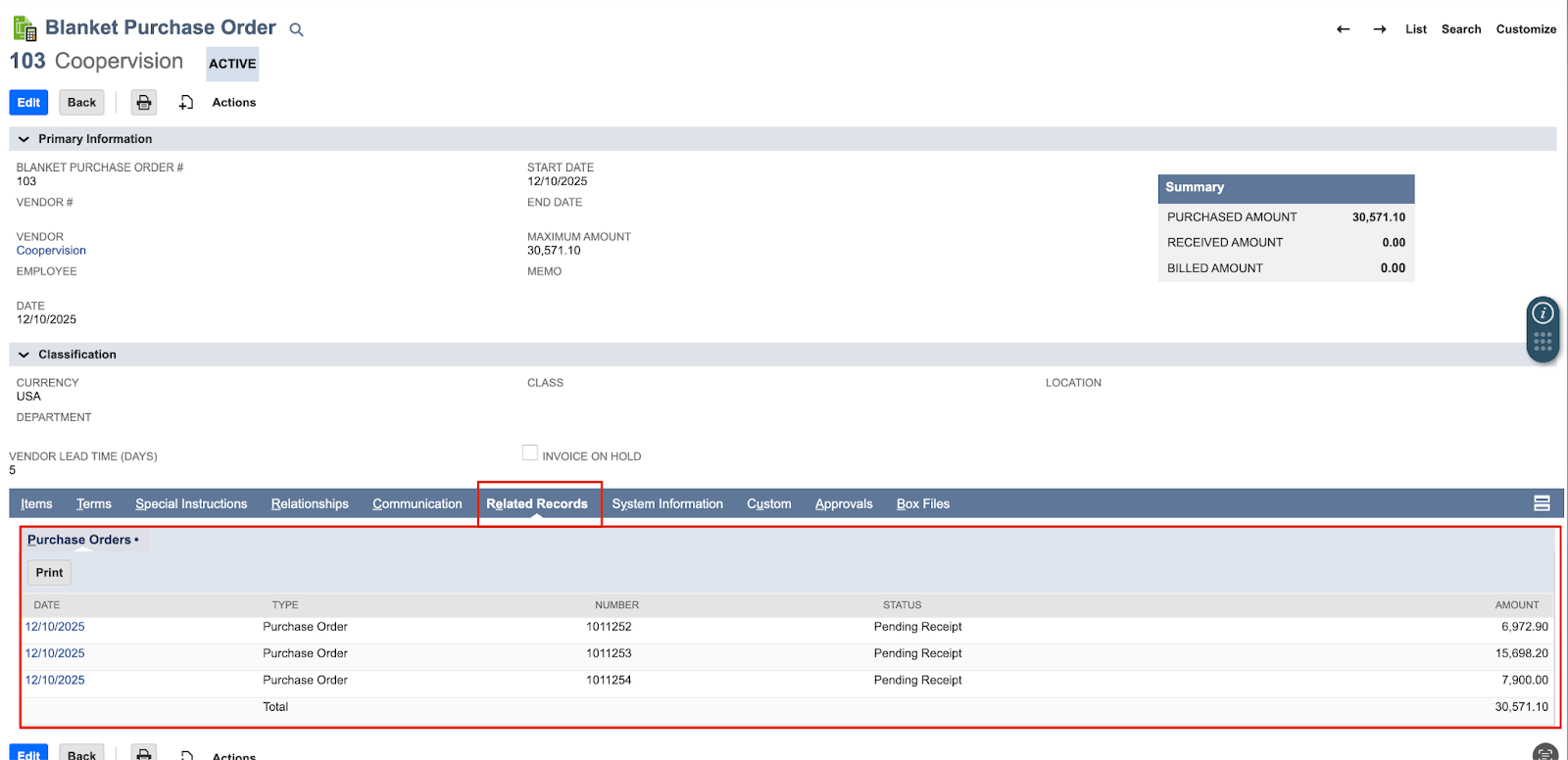
Now layer in a prepayment. You've sent the vendor $7,000 upfront to secure the order. Which of those three sub-POs does the prepayment apply to? All of them proportionally? Just the first one? Only invoices that arrive after a certain date?
See Centime in action
Our innovative AR, AP and business banking solutions are powerful alone, and even better together.
Schedule a tailored demo with a Centime expert.
What Most Finance Teams Do (And Why It Creates Problems)
The typical mid-market approach involves a lot of spreadsheets and institutional memory. Someone in AP keeps track of prepayments in Excel. When invoices come in, they manually check whether a prepayment exists, then manually adjust the payment amount.
Research from SAP Concur's 2025 AP Automation Trends Report found that 60% of AP teams still manually key invoices into their ERP systems, even though this rate dropped from 85% in 2023. The manual entry problem compounds when prepayments are involved because you're not just entering invoice data. You're also maintaining separate records of vendor prepayments and mentally tracking which prepayments apply to which invoices.
The consequences show up in predictable ways:
Vendor statement reconciliations take forever because your AP balance doesn't match what the vendor shows. Prepayments sit unapplied for months, artificially inflating your assets. Duplicate payments happen when someone doesn't realize a prepayment already covered part of an invoice. And your month-end close drags on while the team untangles the accounting.
How the Workflow Should Actually Function
NetSuite's vendor prepayment functionality illustrates what a proper blanket PO and prepayment workflow looks like when configured correctly. The key insight is that prepayments need to be linked to purchase orders, not tracked separately.
When a prepayment is associated with a specific PO in NetSuite, the system can automatically apply that prepayment to bills as they're entered. The Auto-Apply accounting preference handles this without manual intervention. The prepayment gets applied from oldest bill to newest, using the maximum prepayment amount available for each application.
The workflow breaks down into distinct steps:
First, create the blanket PO establishing the overall agreement with your vendor, including maximum amount, line items, and scheduled deliveries. Second, generate sub-POs from the blanket PO representing each scheduled delivery. Third, create vendor prepayments and link them to the relevant POs. Fourth, receive goods against each PO as deliveries arrive. Fifth, match and process vendor invoices as they come in. Sixth, watch the prepayments automatically apply to reduce the payment due.
That last step is where the magic happens. When you post a bill in your GL, and a linked prepayment exists, the system creates the vendor prepayment application automatically. The bill shows as "Paid in Full" if the prepayment covers the entire amount, or the balance due reflects the remaining amount after applying the prepayment credit.
See Centime in action
Our innovative AR, AP and business banking solutions are powerful alone, and even better together.
Schedule a tailored demo with a Centime expert.
Where Centime Fits in This Process
For companies using Centime's AP automation alongside NetSuite, the invoice matching and billing step happens in Centime rather than directly in the ERP. This is actually where the most time gets saved.
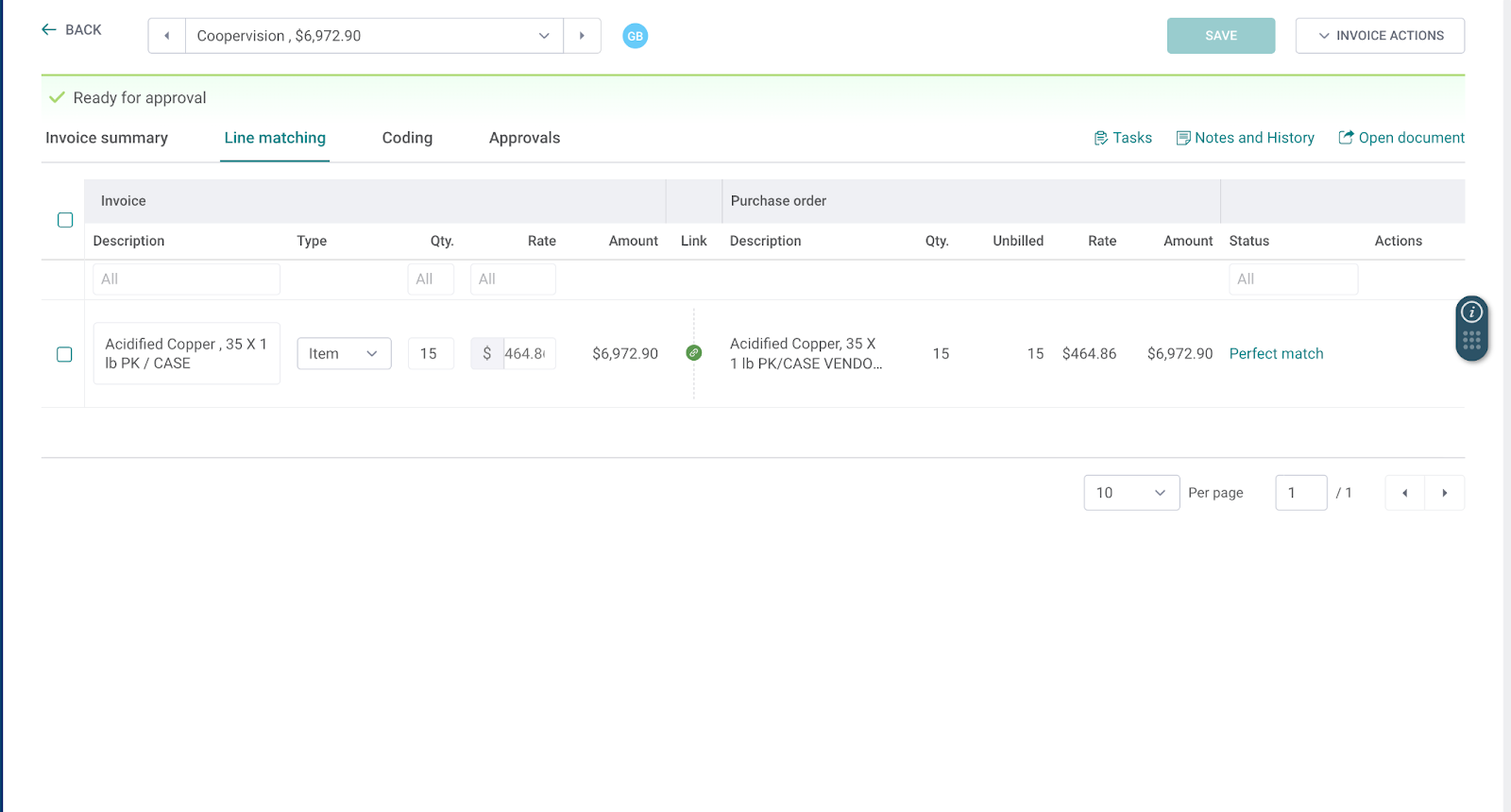
When you upload a vendor invoice in Centime, the system uses OCR to extract invoice data and automatically matches it to the corresponding PO. The PO matching capability handles line-level matching, comparing quantities, rates, and amounts between the invoice and the original purchase order. A "Perfect match" status indicates everything aligns. Discrepancies get flagged for review.
After matching, the invoice routes through your approval workflow in Centime. Once approved and posted to NetSuite, the linked prepayment automatically applies. The bill appears in your paid invoices tab with a $0.00 payment amount due if the prepayment fully covers it.
The rapid coding feature speeds up the front end of this process by automatically suggesting GL codes based on historical patterns. For recurring blanket PO scenarios where you're processing similar invoices repeatedly, the system learns your coding preferences.
See Centime in action
Our innovative AR, AP and business banking solutions are powerful alone, and even better together.
Schedule a tailored demo with a Centime expert.
The Numbers That Matter
Understanding the financial impact of getting this wrong (or right) helps prioritize whether your team should address blanket PO and prepayment workflows.
DocuClipper's analysis of AP statistics found that the average cost of processing an invoice manually runs about $15, while automated systems can reduce this to $3-5 per invoice. The time difference is equally stark: manual invoice processing averages 14.6 days, while NetSuite's documentation cites research showing highly automated firms average just 3.1 days per invoice compared to 17.4 days for organizations with limited automation.
For prepayment scenarios specifically, the stakes go beyond processing efficiency. Unapplied prepayments represent cash you've already spent that isn't reducing your vendor balances. This affects your working capital calculations, vendor relationship health (they see outstanding balances you believe are covered), and potentially your audit findings if prepayments sit unapplied across period boundaries.
A fully automated AP employee can handle 23,333 invoices annually, according to industry benchmarks, while manual processing limits capacity to 6,082 invoices per year. For growing mid-market companies, that capacity constraint becomes a real ceiling on how much purchasing volume the finance team can support.
See Centime in action
Our innovative AR, AP and business banking solutions are powerful alone, and even better together.
Schedule a tailored demo with a Centime expert.
Configuration Decisions That Actually Matter
If you're running NetSuite with vendor prepayments, a few configuration choices significantly affect how smoothly this workflow operates.
The Auto-Apply accounting preference should be enabled unless you have specific reasons to manually control prepayment application. When enabled, the system handles prepayment application automatically when certain conditions are met: the prepayment must be linked to a PO, the prepayment status must be "Paid" or "Partially Applied," and the bill must have "Open" status (not Payment Hold or Pending Approval).
Your default vendor prepayment account needs to be configured at the company level (or subsidiary level for OneWorld). This should be an Other Current Asset type account that holds prepayment funds until they're applied against vendor bills.
For blanket POs specifically, make sure your team understands the relationship between the blanket PO and the sub-POs it generates. The blanket PO tracks the overall agreement and maximum amount. Sub-POs represent actual scheduled deliveries and are what invoices get matched against. Prepayments can be linked at either level depending on your vendor arrangement.
What This Looks Like in Practice
Take the Coopervision example from earlier. A blanket PO for $30,571.10 generates three sub-POs with "Pending Receipt" status:
- PO #1011252: $6,972.90 (Acidified Copper, 35 X 1 lb PK/CASE)
- PO #1011253: $15,698.20 (pH safe liquid, Sodium Bisulfate, 5gal bottles)
- PO #1011254: $7,900.00 (CID 2000, UN3149, 2.0 GAL/ bottle)
Your vendor prepayments for this blanket PO might include multiple transactions at different amounts ($7,000, $7,900, etc.) with statuses like "Fully Applied," "Partially Applied," or "Paid" depending on where things stand.
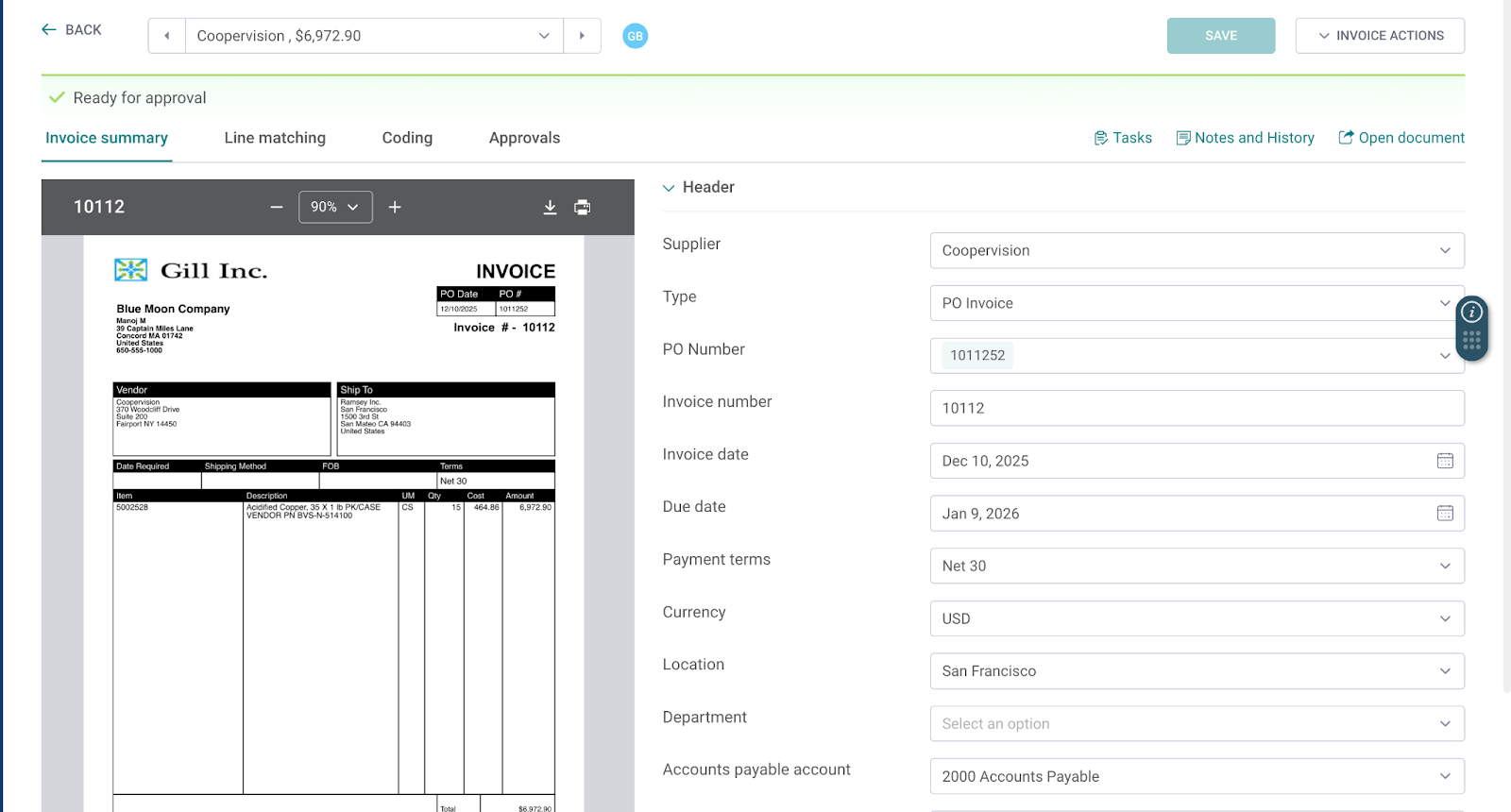
When invoice #10112 arrives for $6,972.90 against PO #1011252, uploading it in Centime triggers automatic line matching. The invoice shows 15 cases at $464.86 each. The PO shows the same. Status: Perfect match.
After approval routing, the invoice posts to NetSuite. Because a prepayment was linked to this PO, the vendor prepayment application creates automatically. Bill #10112 shows "PAID IN FULL" status with the prepayment application record showing the $6,972.90 credit.
In Centime's Paid Invoices tab, this invoice appears with $0.00 payment amount and "Paid in General Ledger" status. The related PO automatically updates to "FULLY BILLED" status.
No manual prepayment tracking required. No reconciliation headaches. No mystery balances on vendor statements.
Getting From Here to There
If your current process involves spreadsheet tracking of prepayments and manual bill adjustments, transitioning to an automated workflow requires a few steps.
First, audit your existing prepayments. Identify any vendor prepayments sitting in holding accounts that haven't been applied to bills. These need to be cleaned up before implementing automated workflows, or they'll create confusion.
Second, establish the linkage between prepayments and POs. For prepayments already in your system, determine which POs they should apply to. Going forward, create prepayments directly from the PO (using the "New Vendor Prepayment" button on the PO page in NetSuite) to ensure the linkage exists.
Third, configure your accounting preferences. Enable Auto-Apply if you want hands-off prepayment application. Set your default prepayment accounts at appropriate organizational levels.
Fourth, integrate your invoice processing workflow. Whether you're using Centime's AP automation or processing invoices directly in NetSuite, make sure bills are created through channels that support automatic prepayment application. In NetSuite, this means using the Bill button on the PO page or the Transactions > Payables > Bill Purchase Orders page rather than Transactions > Payables > Enter Bills.
The payoff extends beyond cleaner accounting. With 65% of AP teams now partnering with treasury to guide cash flow and payment timing decisions (according to Quadient's 2025 AP statistics), having accurate visibility into prepayment balances and vendor obligations directly supports strategic cash management.
See Centime in action
Our innovative AR, AP and business banking solutions are powerful alone, and even better together.
Schedule a tailored demo with a Centime expert.
The Bigger Picture
Blanket POs and prepayments represent just one workflow where AP automation creates tangible value. But it's a particularly instructive example because it touches multiple systems (procurement, AP, general ledger), multiple transaction types (POs, prepayments, bills, applications), and multiple stakeholders (purchasing, AP, vendors, controllers).
Getting this workflow right demonstrates whether your finance tech stack actually talks to itself or whether you're still manually bridging gaps between systems. For mid-market companies processing meaningful invoice volumes, those gaps consume real hours every month and create real errors that affect real vendor relationships.
The good news: the technology to automate this workflow exists today and integrates with the ERPs mid-market companies actually use. The question isn't whether it's possible. It's whether your team has prioritized implementing it correctly.