
.png)
Manual PO matching has always been one of the most painful parts of accounts payable. Finance teams get stuck comparing line items, chasing down mismatches, and waiting for stakeholders to confirm whether a discrepancy is legitimate or needs correction. Centime now brings enhanced support for PO matching into the Sage Intacct embedded experience—turning what used to be a manual, error-prone process into a streamlined, automated workflow.
From Non-PO to PO Invoices: A Unified AP Experience
Until now, Sage Intacct users processing vendor invoices had to treat PO-based invoices differently, creating unnecessary friction in the workflow. With this launch, Centime brings PO and non-PO invoices into one streamlined process inside Intacct, automatically flagging when an invoice is tied to a purchase order and pulling the PO details into view.
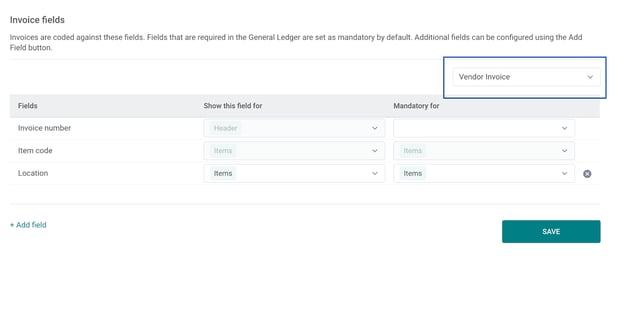
This means AP staff no longer have to wonder, “Does this invoice have a PO?” The system identifies it instantly, opening the PO number and line matching tab so matching can begin immediately.
How Automated Line Matching Works
Here’s where the heavy lifting happens. Once Centime recognizes a PO-based invoice, it automatically matches invoice lines to purchase order lines. In most cases, it’s a clean match: unit costs, quantities, and totals all align. When that happens, the invoice can move directly to approval without human intervention.
But mismatches are inevitable. Maybe the vendor shipped fewer units than ordered. Maybe the unit price on the invoice doesn’t reflect the agreed discount. Or maybe freight charges weren’t captured in the original PO. Instead of dumping this problem back on AP staff, Centime flags the discrepancy with clear status labels—Rate Mismatch, Quantity Mismatch, Amount Mismatch, or Out of Threshold. That level of specificity matters because it reduces the time spent diagnosing the issue and makes it obvious who needs to weigh in.
Control When You Need It: Resolving Mismatches
Automation doesn’t mean losing control. AP managers still decide how to handle exceptions, and the workflow is designed to support those judgment calls. When Centime flags a mismatch, you can:
- Accept the variance if it falls within an approved tolerance.
- Await Receipt if goods are still in transit.
- Dispute with the vendor when the invoice appears incorrect.
- Reject entirely if the invoice shouldn’t move forward.
The key advantage is that these actions happen in context, right inside the matching workflow, with audit trails intact. You’re not flipping between systems or relying on email threads that get lost.
Configurable Rules and Thresholds
Every business handles variance differently. A 2% rate mismatch might be acceptable for one organization but a red flag for another. Centime’s PO workflow recognizes this and allows finance teams to configure thresholds for rates, quantities, and amounts directly within Sage Intacct.
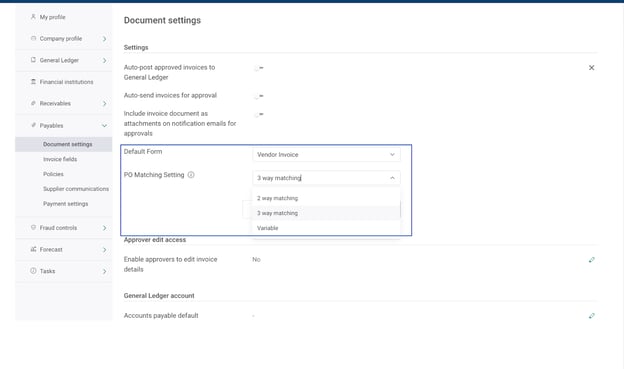
That means no more one-size-fits-all matching logic. You get automation that adapts to your policies instead of the other way around.
Closing the Loop Back in Intacct
Once invoices are matched, variances resolved, and approvals applied, Centime posts the clean invoice back into Sage Intacct. The GL stays current, POs are updated, and you avoid the classic month-end reconciliation scramble. This tight integration is critical—not just for accuracy but for adoption. AP teams don’t want to manage yet another system; they want automation to sit inside their existing workflow.
Why This Matters for Controllers and CFOs
The real win here isn’t just faster processing—it’s risk reduction and visibility. Manual PO matching is one of the easiest places for errors, duplicate payments, or even fraud to slip through. By automating the tedious comparison work and forcing exceptions into clear categories, Centime dramatically reduces those risks.
And for CFOs, this unlocks something bigger: predictable, scalable controls. Whether you’re processing 500 invoices a month or 50,000, the logic doesn’t change and your audit posture improves. That’s the kind of foundation that supports growth without ballooning headcount.
Practical Advice for Teams Adopting This
If you’re about to roll out PO matching in Intacct, don’t just flip the switch and hope for the best. A few steps make all the difference:
- Start by defining tolerances. Decide what’s acceptable variance for your business before automation enforces it.
- Engage purchasing stakeholders. They’re often the ones creating POs, so align expectations around accuracy and timing.
- Run a pilot. Test the workflow with a subset of invoices and review mismatch trends—this will surface data entry or vendor-side issues early.
- Monitor exception categories. A spike in “Rate Mismatches” often points to contract misalignment; “Quantity Mismatches” may signal receiving issues.
This isn’t just an efficiency play—it’s a diagnostic tool for the health of your procurement and AP processes.
Final Word
With PO matching now embedded in Sage Intacct through Centime, AP teams finally have a way to reconcile purchase orders and invoices without drowning in manual checks. It’s automation that respects nuance, gives finance leaders control where it counts, and eliminates the friction that slows down payments and distorts cash flow.
Ready to Put This to Work?
If you’re already a Centime customer, reach out to your Customer Success Manager to enable enhanced PO matching in your Sage Intacct environment.
Not yet using Centime? Book a demo to see how our deep embedded integration with Sage Intacct can streamline your AP processes, strengthen controls, and save your team hours every week.
See AP automation on your NetSuite data
Book a 20-minute walkthrough on your own AP workflow. No slides.