
.png)
If you’ve worked in accounts receivable for any length of time, you know two truths: chasing overdue invoices is exhausting, and the difference between getting paid this week or next often comes down to timing. Centime’s automation engine takes those repetitive follow-ups, escalations, and reminders off your plate — without losing the nuance of when and how they should happen.
Here are five automation “recipes” you can implement right now to streamline collections, all based on capabilities available in Centime.
See Centime in action
Our innovative AR, AP and business banking solutions are powerful alone, and even better together.
Schedule a tailored demo with a Centime expert.
1. Call High-Value Accounts When Invoices Pass 30 Days Overdue
Some balances deserve a personal touch.
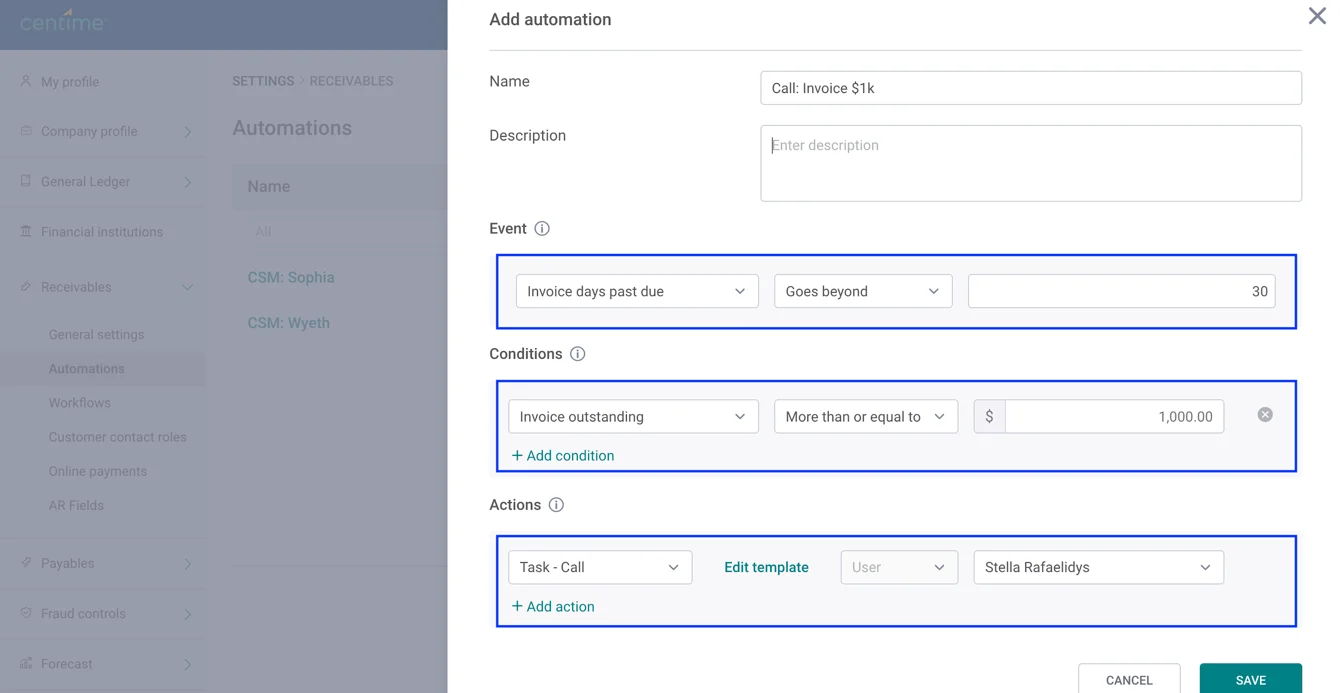
- Event: Invoice is more than 30 days overdue.
- Condition: Invoice amount is greater than $1,000.
- Action: Assign a “Call Customer” task to the designated account owner.
This is perfect for situations where you’d rather pick up the phone than send yet another email. The condition ensures you’re spending your time on accounts that matter most to cash flow.
2. Email Customers Immediately When a Payment Status Changes
The faster a customer hears from you after a payment status changes, the better the chance of resolving issues before they snowball.
- Event: Invoice status changes to “Overdue.”
- Action: Send a customer email (up to 15 recipients) with your overdue notice template.
Because this is triggered on a field change, you’re not waiting for a scheduled batch — it’s instant.
See Centime in action
Our innovative AR, AP and business banking solutions are powerful alone, and even better together.
Schedule a tailored demo with a Centime expert.
3. Escalate Large Overdue Balances to Finance Leadership
Big outstanding balances shouldn’t sit unnoticed.
- Event: Customer’s consolidated overdue amount exceeds $10,000.
- Action: Send an internal email to your Controller and CFO (up to 15 users).
Using customer-level events with consolidated balances is key here — especially if you have parent/child billing structures where overdue amounts can hide at the child level.
4. Assign Follow-Up Tasks Only to Specific Customer Segments
Not every customer segment should be chased the same way.
- Event: Customer overdue percentage is more than 50%.
- Condition: Customer segment is in “High Risk” list.
- Action: Assign a “Follow-Up” task to the collections specialist responsible for that segment.
By narrowing actions with both numerical and list-based conditions, you avoid overwhelming your team with low-priority work.
5. Automate Reminders for Smaller Invoices Without Manual Review
Smaller balances still add up — but they don’t always need human oversight.
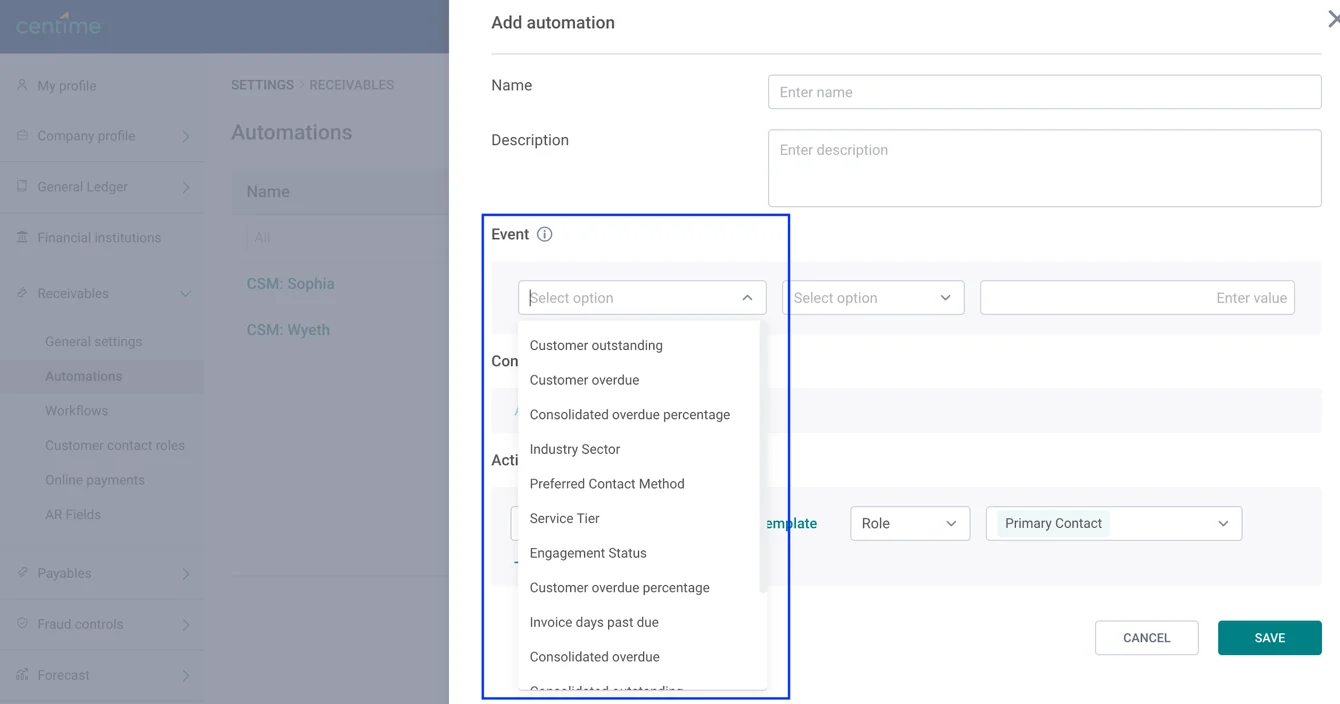
- Event: Invoice is more than 15 days overdue.
- Condition: Invoice amount is less than or equal to $500.
- Action: Send an automated reminder email to the customer.
This keeps your collections process moving for low-dollar invoices while freeing up time for more complex cases.
Putting Your Automations Into Action
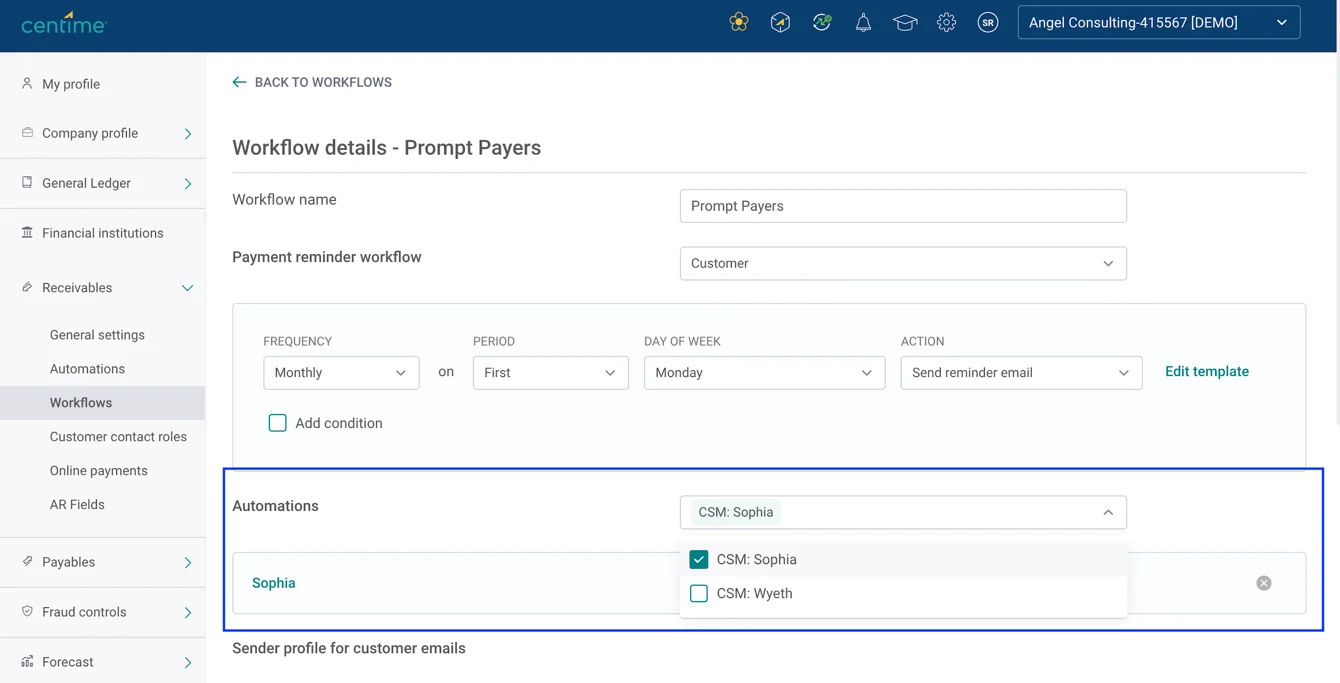
Once your automations are built, they’re not doing anything until they’re active in the right workflows. In Centime, you can enable them directly from the Customer Segment Workflows screen.
- Navigate to Settings > Receivables > Workflows.
- Select the customer segment workflow you want to update.
- In the Automation section, choose your newly created automation(s) from the list.
- Save the workflow.
You can add automations to any campaign type — invoice-level, customer-level, or none — and each workflow can contain up to 100 automations. This flexibility means you can run multiple targeted sequences in parallel without hitting system limits.
Implementation Tips
- Combine up to 10 conditions for precise targeting.
- Use up to 5 actions per automation to bundle communications, alerts, and task assignments in one trigger.
- Remember: invoice-level events can only trigger invoice-level actions, and customer-level events can only trigger customer-level actions.
- For recurring scenarios, you can copy existing automations and adjust the parameters instead of building from scratch.
- Track results in customer or invoice history to see the full impact of your automations.
See Centime in action
Our innovative AR, AP and business banking solutions are powerful alone, and even better together.
Schedule a tailored demo with a Centime expert.
The takeaway: These five examples are just a starting point. With Centime, you can combine events, conditions, and actions in countless ways to make sure the right people take the right steps at the right time — without adding to your to-do list.
If you’re not using Centime yet, book a demo to see these automations in action.
Already a customer? Reach out to your CSM to start building your first set today.